> For the complete documentation index, see [llms.txt](https://docs.stoik.io/llms.txt). Markdown versions of documentation pages are available by appending `.md` to page URLs; this page is available as [Markdown](https://docs.stoik.io/broker/nl/aan-de-slag/user-management.md).
# Gebruikersbeheer
### Uitnodiging
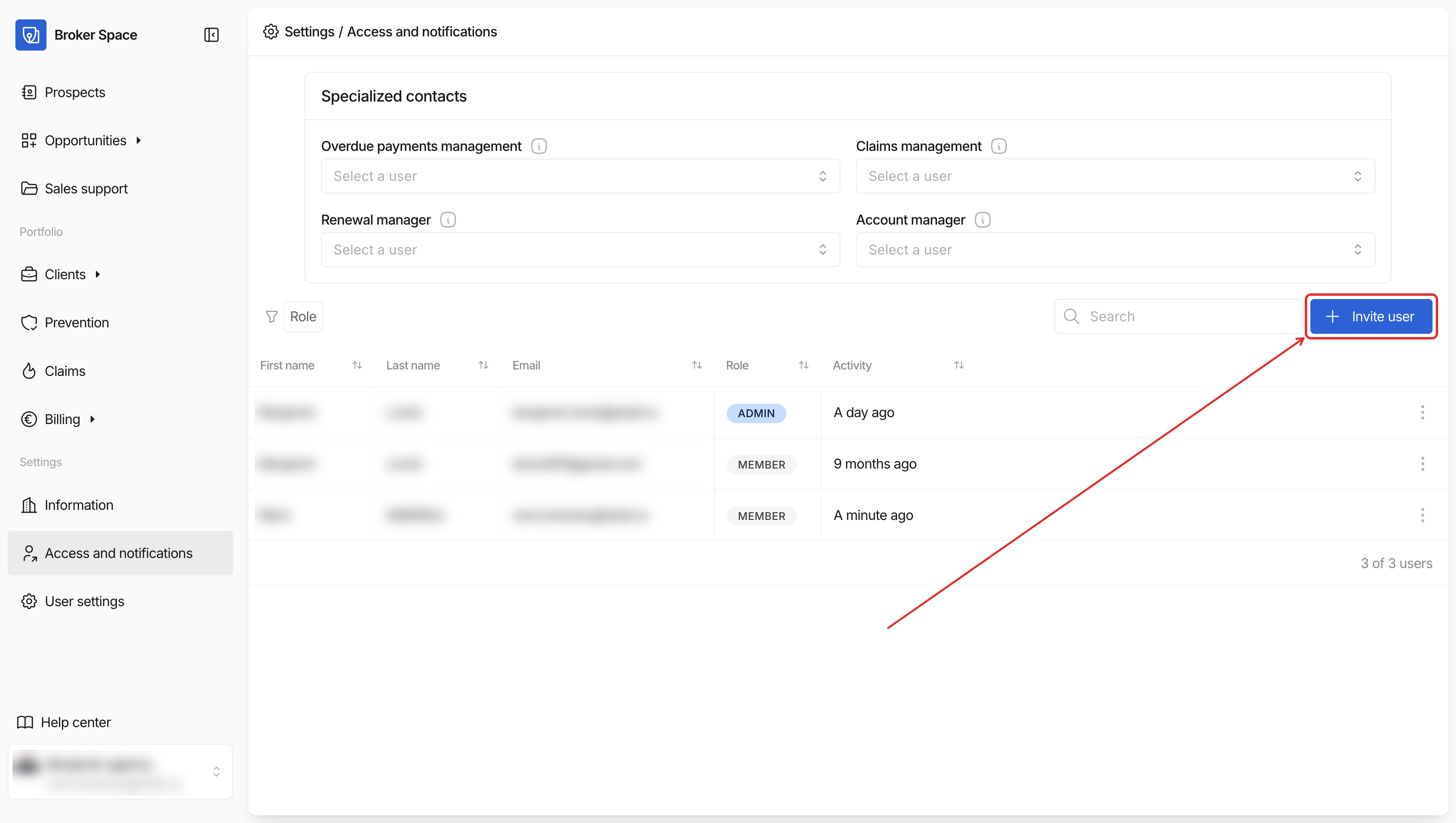
De makelaar kan nieuwe gebruikers uitnodigen voor de Broker Space door naar te gaan `Instellingen` > `Toegang en meldingen` > `Bedrijfstoegang`. Voer het e-mailadres van een collega in en klik vervolgens op `Uitnodigen`.
De uitgenodigde gebruiker ontvangt een e-mail van Stoïk waarin hij/zij wordt uitgenodigd om een account aan te maken en een wachtwoord te kiezen.
### Eigenaren
Om het delen van informatie binnen het kantoor eenvoudiger te maken, kunnen meerdere eigenaren worden aangewezen:
* De accountmanager ontvangt alle meldingen die naar de klant worden gestuurd.
* De accounthouder ontvangt meldingen die naar de klant worden gestuurd nadat het contract is ondertekend.
* De betalingsbeheerder ontvangt waarschuwingen over de onbetaalde facturen van de klant.
* De schadebehandelaar ontvangt waarschuwingen over de claims van de klant.
### Rollen
Er bestaan verschillende rollen voor gebruikers op de Broker Space:
* "Admin"-gebruikers hebben toegang tot de volledige Broker Space en ontvangen alle transactionele e-mails die door Stoïk worden verzonden.
* "Member"-gebruikers hebben **geen toegang** tot:
* de `Facturatie` tabblad
* gegevensexports van het `Prospecten`, `Cliënten`, en `Facturatie` tabbladen
* het ondertekenen van de mede-makelaarsovereenkomst, beschikbaar via het `Instellingen` tabblad
Standaard zijn alle gebruikers "Admin".
---
# Agent Instructions
This documentation is published with GitBook. GitBook is the documentation platform designed so that both humans and AI agents can read, navigate, and reason over technical content effectively. Learn more at gitbook.com.
## Querying This Documentation
If you need additional information that is not directly available in this page, you can query the documentation by asking a question.
Perform an HTTP GET request on the following URL with the `ask` and `goal` query parameters:
```
GET https://docs.stoik.io/broker/nl/aan-de-slag/user-management.md?ask=&goal=
```
`ask` is the immediate question: it should be specific, self-contained, and written in natural language.
`goal` is what the user is ultimately trying to achieve, the reason they need the answer. Sharing it helps GitBook give you a better, more relevant answer. A goal is most helpful when it describes the outcome the user wants rather than restating the question. For example, with `ask=how do I create an API token`, a goal like `automate deployments from our CI pipeline` lets GitBook tailor the answer to that use case.
The response will contain a direct answer to the question and relevant excerpts and sources from the documentation.
Use this mechanism when the answer is not explicitly present in the current page, you need clarification or additional context, or you want to retrieve related documentation sections.