> For the complete documentation index, see [llms.txt](https://docs.stoik.io/llms.txt). Markdown versions of documentation pages are available by appending `.md` to page URLs; this page is available as [Markdown](https://docs.stoik.io/broker/policy-management/renewal-process.md).
# Renewal process
### Renewal notification
Four months before your client's renewal date, we send you a renewal email with all relevant information and a link to the renewal quote. From that date, you can check the relevant renewal information directly in the Broker Space.
{% hint style="info" %}
Make sure the people in charge of renewals have access to your Broker Space.
{% endhint %}
A few things to check before modifying the renewal:
* **Business activity**
* Turnover
* Number of employees
* Activity sector
* Subsidiaries and additional insureds
* **Information system**
* Backups
* MFA
* Antivirus/MDR
* Improvements/deteriorations
* **Coverage**
* Limit of indemnization
* Deductible
### Renewal validation process
#### Tacit renewal
If all of this information remains unchanged from the current engagement period, no further action is necessary on your side. The Stoïk insurance contract renews automatically and tacitly at the renewal date.
All relevant renewal documents (premium call, insurance certificate) will be available automatically after the renewal date.
{% hint style="info" %}
If you wish to access the documents before the renewal date, you can validate the renewal without changes. This immediately uploads the renewal documents to the client page in your Broker Space.
{% endhint %}
#### Renewals with a modification
If the contract information needs to be modified before renewal, you can do so with a few clicks in your Broker Space.
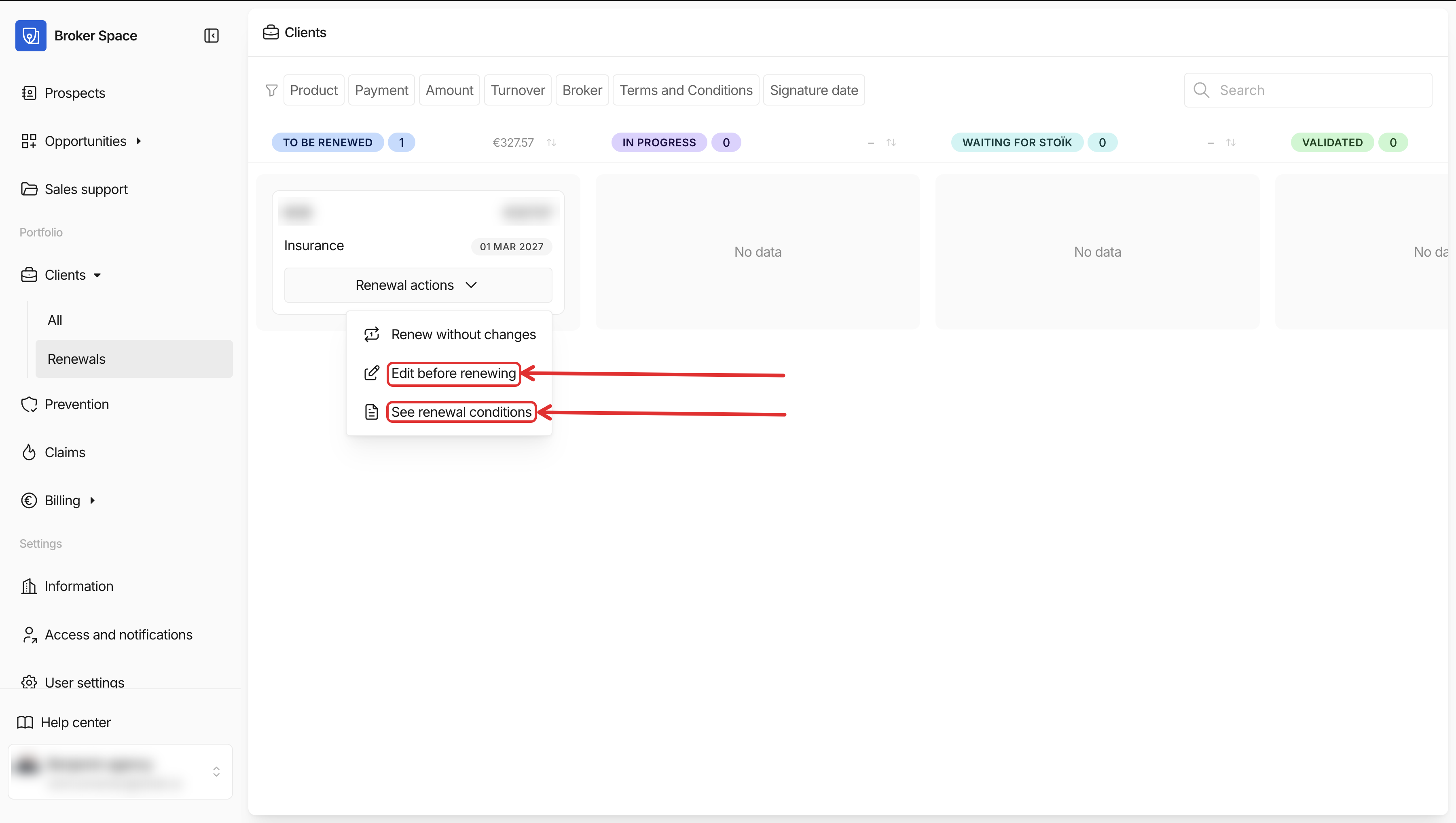
You can see all clients currently in their renewal period in the `Renewals` tab of the Broker Space.
You can access the renewal page for editing and validation directly from this tab. If you're unsure what conditions the contract would renew on tacitly, you can also check that information from here.
### Renewal process per subscription type
{% hint style="info" %}
Overall, renewal quotes work exactly like new business quotes.
{% endhint %}
#### Standard contracts
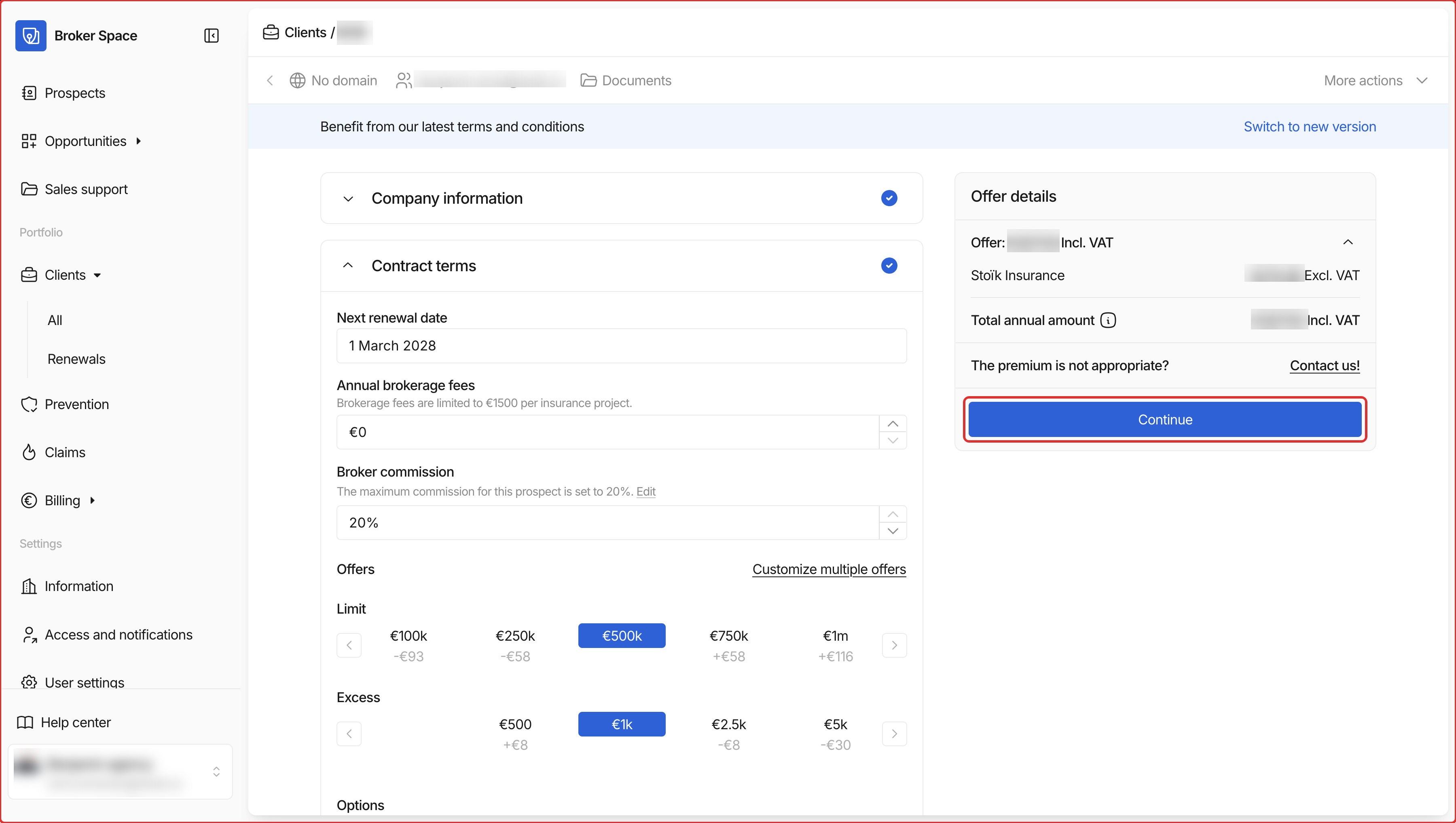
From the client's renewal page, you can modify all relevant company information, the desired coverage, and the answers to the risk questions. Once all necessary updates are done, continue to renewal validation via the `Continue` button.
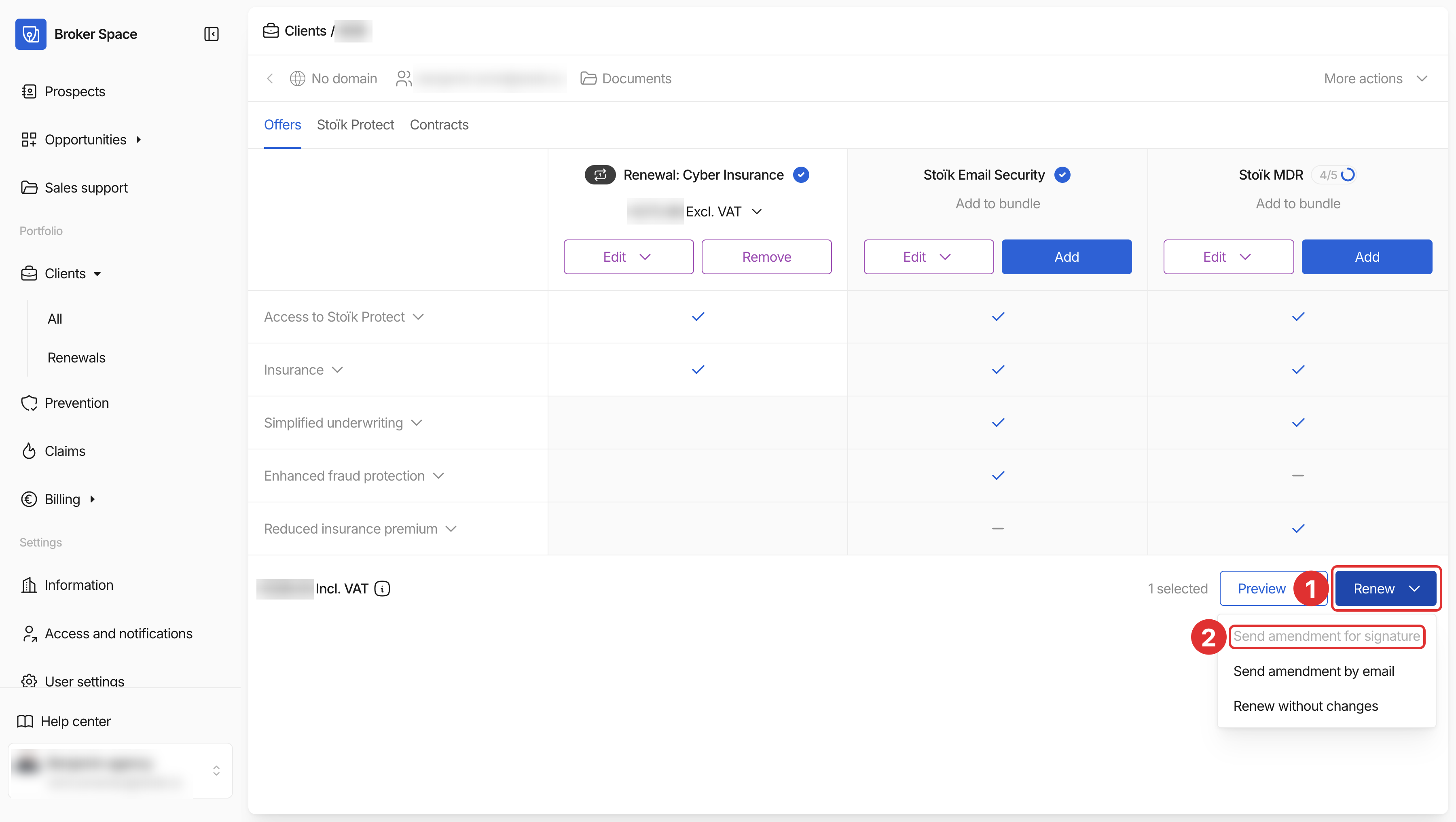
On the following page, you can send the renewal amendment for signature to the client. This sends a link for e-signature. Once the renewal amendment is signed, the renewal is confirmed and all relevant documents become available on the client page in your Broker Space.
#### Custom contracts
For contracts that need an individual risk assessment, Stoïk needs an updated questionnaire to reassess the risk and make a renewal offer.
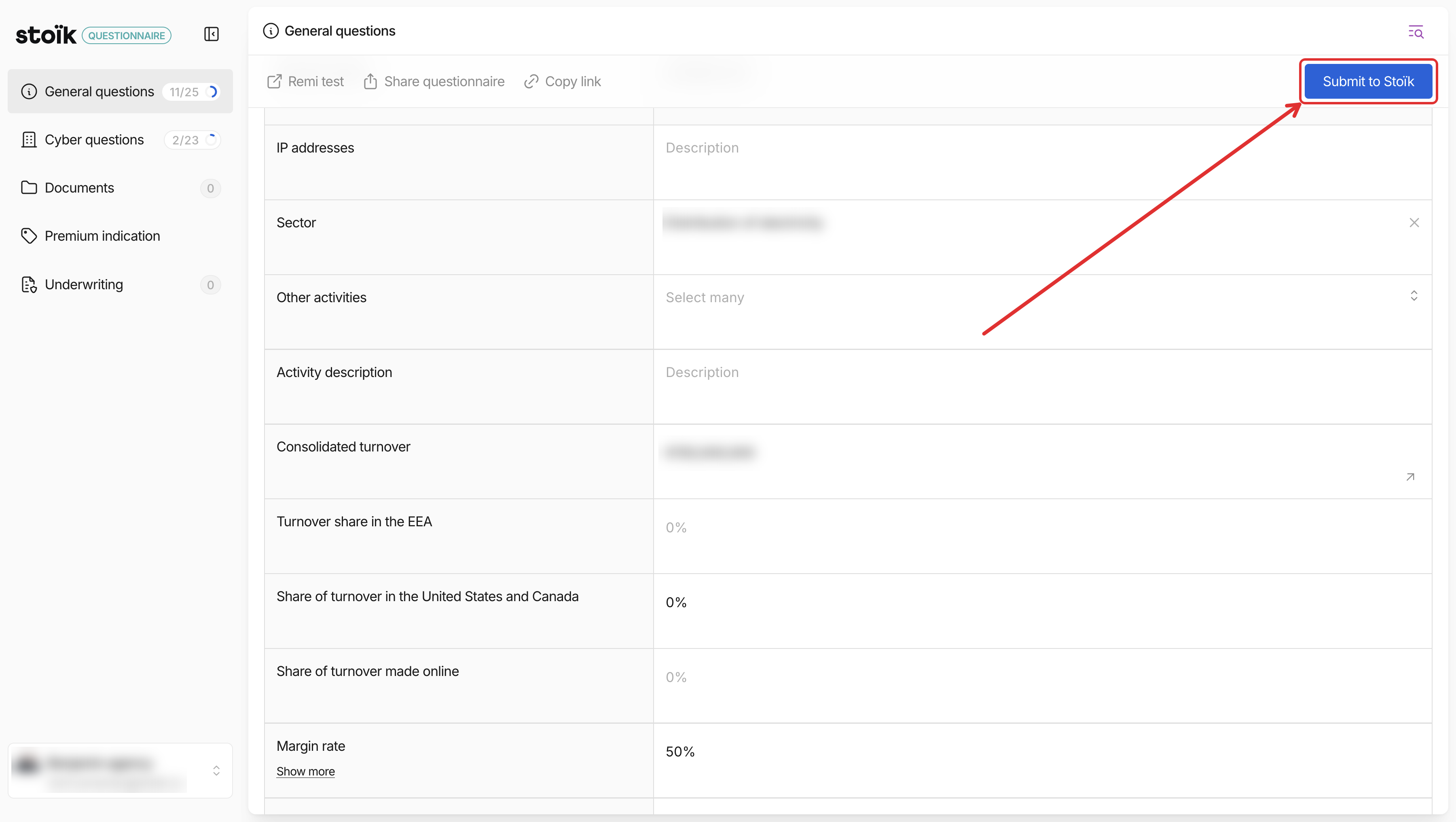
You can access the questionnaire from the renewal page, and also share the link with your client.
The questionnaire is pre-filled with the last valid information. Your client (or you) only need to check that everything is still correct, and update anything that has changed.
Once the questionnaire has been fully reviewed and updated, click `Submit to Stoïk`. Our team will then work on the renewal offer and get back to you.
In case of any questions or need for assistance, our team is available by email at .
### Cancellation
The contract can be cancelled at least two months before the expiry date, either from the Broker Space or by registered letter.
Stoïk reserves the right to cancel the contract, notably in the event of an increase in risk or if the new premium amount is not accepted.
---
# Agent Instructions
This documentation is published with GitBook. GitBook is the documentation platform designed so that both humans and AI agents can read, navigate, and reason over technical content effectively. Learn more at gitbook.com.
## Querying This Documentation
If you need additional information that is not directly available in this page, you can query the documentation by asking a question.
Perform an HTTP GET request on the following URL with the `ask` and `goal` query parameters:
```
GET https://docs.stoik.io/broker/policy-management/renewal-process.md?ask=&goal=
```
`ask` is the immediate question: it should be specific, self-contained, and written in natural language.
`goal` is what the user is ultimately trying to achieve, the reason they need the answer. Sharing it helps GitBook give you a better, more relevant answer. A goal is most helpful when it describes the outcome the user wants rather than restating the question. For example, with `ask=how do I create an API token`, a goal like `automate deployments from our CI pipeline` lets GitBook tailor the answer to that use case.
The response will contain a direct answer to the question and relevant excerpts and sources from the documentation.
Use this mechanism when the answer is not explicitly present in the current page, you need clarification or additional context, or you want to retrieve related documentation sections.

 {% endhint %}
#### Renewals with a modification
If the contract information needs to be modified before renewal, you can do so with a few clicks in your Broker Space.
You can see all clients currently in their renewal period in the `Renewals` tab of the Broker Space.
{% endhint %}
#### Renewals with a modification
If the contract information needs to be modified before renewal, you can do so with a few clicks in your Broker Space.
You can see all clients currently in their renewal period in the `Renewals` tab of the Broker Space.