> For the complete documentation index, see [llms.txt](https://docs.stoik.io/llms.txt). Markdown versions of documentation pages are available by appending `.md` to page URLs; this page is available as [Markdown](https://docs.stoik.io/news/readme.md).
# Changelog
New updates and improvements to Stoïk.
{% updates format="full" %}
{% update date="2026-09-29" %}
## Human Security Advanced: Training That Adapts to Each Employee
Stoïk is launching Human Security Advanced, a new offer to strengthen your cybersecurity posture where most attacks succeed: your employees. It builds on what our claims and incident response teams see every day, and adapts to each employee until they no longer need us.
What's in Human Security Advanced
On top of Human Security, included with your insurance:
**Simulation**
* All simulation types: payment fraud, vishing (coming soon), and more.
* AI-assisted phishing templates.
**Training**
* Five Stoïk-built topics on top of Foundations.
* Studio to create your own lessons.
* Automatic reminders, on a fixed cadence or based on each employee's score.
* Reminders on Slack, Microsoft Teams and Google Chat (coming soon).
**Employee Security Score**
* One score per employee, built from simulation results, training progress and reported emails.
* Training reminders and simulation frequency (coming soon) adapt to the score: the riskiest employees get more attention, the most mature are left alone.
Available to organisations using Google Workspace or Microsoft 365.
Interested? Book a meeting with our Cyber team: in Stoïk Protect, open any feature marked Advanced in `Human Risk` and click `Book meeting`.
{% endupdate %}
{% update date="2026-09-04" %}
## **Email Security: Know What Happened, Know It's Watching**
An alert on a suspicious email or a compromised account is only useful if you can quickly understand what happened, and know monitoring is actually running while you wait for the next one. Two updates to Email Security's Suspicious Emails and Compromised Accounts modules address exactly that.
**What's new**
* Alerts now open full screen instead of in a side drawer, with a timeline of every event tied to the alert, from first detection onward.
* New context on the attacker, and a summary banner in the timeline.
* Two new columns show whether monitoring is active for suspicious emails and mailboxes.
**Why it matters**
* A clearer picture of what happened. Before, it was hard to follow the full story of an attack on an email or account. The full-screen timeline makes it clear from first event to attacker details.
* No more guessing if Suspicious emails and Compromised Accounts are being detected. The status tells you at a glance whether detection is live, still ramping up, or off.
**Learn more**:
* [Reading results](https://docs.stoik.io/email-security/how-to-read-email-security-results)
* [Monitored mailbox statuses](https://docs.stoik.io/email-security/how-to-read-the-status-of-monitored-mailboxes)
## Compliance: From NIS 2 Scope to Action Plan
The new `Compliance` tab answers two questions: are you concerned by NIS 2, and if so, what should you have in place?
**What's new**
* An eligibility check in three questions: sector, headcount, turnover. Pre-filled from what we already know about your company.
* A clear outcome: `Essential entity`, `Important entity` or `Not concerned`, with what it means for supervision, liability, sanctions and notification deadlines.
* For entities in scope, the ten measures of Article 21(2) broken down into 40 concrete actions.
* Some actions are linked to a Stoïk Protect tool: already ticked if it's active, otherwise a link to set it up.
**Why it matters**
* NIS 2 names ten themes, not controls. This turns them into actions you can confirm or plan.
* What you already run counts. MDR, scans, training, phishing and credential monitoring are NIS 2 measures, and you can see it.
* Your gaps become a shortlist instead of a report.
Stoïk does not audit or certify compliance. This is a self-assessment to show you where to focus, not proof of compliance.
**Learn more:** [NIS 2](https://docs.stoik.io/onboarding/compliance-checklist/nis-2)
{% endupdate %}
{% update date="2026-07-22" %}
## Cockpit: Manage Multiple Stoïk Protect Accounts from One Place
If you manage more than one Stoïk Protect account, you no longer need to hop between spaces to see who is protected and what needs attention. Cockpit adds a dedicated sidebar section with a fleet-level view of tool deployment and alerts.
**What's new**
* A Cockpit section in the sidebar, visible when your user belongs to two or more Stoïk Protect accounts
* Deployment: a matrix of accounts × tools, statuses per tool
* Three KPIs above the table: Coverage, Activation rate, and Fully protected clients
* Alerts: one table for alerts across all tools and all accounts you manage
**Why it matters**
* Less context switching. MSPs, group CISOs, and multi-account admins get one place to scan deployment and triage alerts.
* Clear operational signals. Coverage and activation show where onboarding stalled; fully protected clients show who is in a good state.
* Faster prioritisation. Action required alerts surface what needs a follow-up without opening every account.
**Learn more:** [Cockpit](https://docs.stoik.io/onboarding/cockpit)
{% endupdate %}
{% update date="2026-07-08" %}
## Credentials: From Leak to Alert
Knowing that a password leaked is useful. Knowing it still opens one of your services today is what makes it urgent. The new Credentials section on Stoïk Protect does both: it surfaces everything found leaked about your organisation, and tells you what we've confirmed is still dangerous right now.
**What's new**
* A dedicated `Credentials` section in the sidebar, separate from External Scan. Leaked credentials and credential alerts now have their own home, their own lifecycle, and their own context.
* Exposed Data: a continuously updated feed of everything leaked about your organisation, across three sub-tabs:
* Raw logs :every leak record, all data types
* Credentials: credential-type leaks only (URL + login + password)
* Cookies: session cookies exfiltrated by infostealer malware, surfaced for the first time
* Alerts: what we've actively confirmed needs action:
* Valid Credentials: a leaked URL + login + password that Stoïk tested and confirmed still grants access to one of your services today. Not a historical record, a working credential.
* Infected Device: an employee device currently compromised by infostealer malware and actively exfiltrating data, as detected by our threat intelligence providers.
* Full context in every entry. Provider source, leak date, data type, and links between related entries, everything you need to investigate.
* Continuous monitoring. Data is refreshed automatically from each provider. Valid Credentials are retested every 3 days and resolve automatically once the password is changed.
**Why it matters**
* More autonomy. The leaked password, where it came from, what it means, what to do; it's all in the product.
* Better coverage. Infected devices and stolen session cookies were previously invisible to clients. Both are now surfaced, so you have a complete picture of your exposure.
* The Stoïk method is visible. A Valid Credentials alert fires because we ran the test and the credential worked. Seeing that explained makes the protection tangible and shows the depth of what's included in your contract.
**Learn more:** [Credentials](https://docs.stoik.io/prevention-tools/credentials)
{% endupdate %}
{% update date="2026-07-06" %}
## Training: Security awareness, built in
Human error is behind the majority of successful cyberattacks. Stoïk Training gives you a direct, structured way to fix that, without leaving Stoïk Protect.
**What's new**
* A complete security awareness training module, available under `Human Security` > `Learning` in Stoïk Protect
* An Employee Portal where employees take lessons at their own pace, with quizzes, a leaderboard, and progress tracking, no Stoïk account needed
* A results dashboard with completion rates, average progress, and per-employee details down to email delivery logs
* Phishing-to-training: when an employee clicks a phishing test, they are automatically redirected to a targeted lesson, an immediate, contextual learning moment
**Why it matters**
* Training is your best defense against human-factor risk. Phishing simulations show you who is vulnerable. Training closes the gap.
* One platform, end to end. Phishing campaigns and awareness training now live in the same place, no external LMS, no separate vendor.
* Employees actually engage. Short, interactive lessons with quizzes and a leaderboard make training something people do, not something they skip.
**Learn more:** [Stoïk Training](https://docs.stoik.io/human-security/stoik-training)
{% endupdate %}
{% update date="2026-07-01" %}
## Report Suspicious Emails in One Click
Your employees are your last line of defense against phishing that slips past your filters. The `Report to Stoïk` button lets every employee flag a suspicious email directly from their Gmail or Outlook inbox, and routes it straight to you in Stoïk Protect.
**What's new**
* A simple setup to deploy the `Report to Stoïk` button on your employees' Gmail or Outlook mailbox.
* Employees click the button, confirm, and the report is sent instantly.
* Stoïk automatically classifies every report: a Stoïk phishing simulation, or a suspicious external email.
* Employees get immediate in-mailbox feedback: a congratulations message if they caught a simulation, or a confirmation that the IT team has been notified.
* All reported emails are centralized in the Report tab of Stoïk Protect, with full context: sender, subject, body preview, attachments, source, and validity.
* External emails are ready for you to triage from Stoïk Protect. If you have Stoïk Email Security, the analysis is fully automated.
**Why it matters**
* Phishing that slips through gets caught. Even the best filters miss some emails. A human report is the safety net.
* Simulations become measurable. Reports from Stoïk phishing campaigns flow directly into campaign stats and awareness metrics, giving you a clearer picture of employee vigilance.
* Zero friction for employees. One click. No forms. No context switching. Over-reporting is safe; clicking on a real phishing link is not.
* One place to triage. All suspicious emails reported by your employees land in a single, centralized view in Stoïk Protect.
* Automated response with Email Security. Confirmed real threats are identified and contained by the SOC automatically, no manual investigation needed.
**Learn more**
* [How Stoïk Report works](https://docs.stoik.io/human-security/how-stoik-report-works)
* [Deploying Stoïk Report](https://docs.stoik.io/human-security/deploying-stoik-report)
* [Reporting suspicious emails](https://docs.stoik.io/human-security/how-to-report-suspicious-emails-with-stoik)
{% endupdate %}
{% update date="2026-06-05" %}
## Phishing Template Studio: Attachments in Custom Templates
Custom phishing templates can now carry attachments. The most common payload pattern in real phishing — a fake invoice, an HR letter, a shared document — is now reproducible in your own simulations.
**What's new**
* New `Attachments` section in the Custom Template editor, below the email body.
* Drag and drop or browse to add files — up to 5 files, 10 MB each.
* Each file is listed with its name, size and a remove icon. Rejected files (size or type) are flagged inline.
* Attachments are saved with the template and sent with every simulation that uses it.
* Attachments are visible in the template preview, in the Custom library and in campaign results.
**Learn more**
* [How to create a custom phishing template?](https://docs.stoik.io/prevention-tools/what-is-the-phishing-module/how-to-create-a-custom-phishing-template)
* [Understanding phishing templates](https://docs.stoik.io/prevention-tools/what-is-the-phishing-module/understanding-phishing-templates)
{% endupdate %}
{% update date="2026-05-25" %}
## Require MFA on Specific Users
Multi-factor authentication has always been available in Stoïk Protect, but only as an opt-in. Admins now have a way to make it mandatory for the users who matter, with no way to skip it.
**What's new**
* A new **Require MFA** permission in the user side panel, in `Settings > Users`.
* Enforced users without MFA land on a mandatory setup screen at their next sign-in: no `Skip`, no way out until MFA is configured.
* Enforced users can no longer disable their own MFA from their account settings as long as the toggle is on.
* Turn the toggle off later and MFA stays in place. The user simply regains the ability to manage it themselves.
**Why it matters**
* **Compliance, ticked.** Meet ISO 27001, NIS2 and cyber-insurance MFA requirements without chasing each user one by one.
* **Stronger baseline, zero friction for admins.** Pick the users who handle finance, IT or sensitive data. The platform takes care of the rest at next login.
* **No more half-protected accounts.** When MFA is on by policy, it stays on.
**Learn more**
* [How to require MFA for a user?](https://docs.stoik.io/onboarding/how-to-require-mfa-for-a-user)
* [User access management](https://docs.stoik.io/onboarding/user-access-management)
{% endupdate %}
{% update date="2026-05-20" %}
## Email Security Alert Enrichment
Understanding a flagged email shouldn't require detective work. Email Threat alerts in Stoïk Protect now ship with two new layers of context, so the *why* and the *what* of every alert are right there in the side panel.
#### What's new
* **Detection hints:** A clear verdict banner and six automated checks (sender identity, communication history, fraud signals, tone, reputation, email profile) explain exactly what the engine spotted.
* **Email preview:** The full original email is embedded in the side panel, with formatting, images, the SOC warning banner, and safe-to-download attachments.
#### Why it matters
* **See it to believe it.** No more taking the verdict on trust. The evidence and the email are right next to each other.
* **Triage in seconds.** Verdict, signals and original email in one place, no mailbox switching.
* **A real teaching moment.** Show protected users the actual email that almost made it through.
#### **Learn more**
* [How to read Email Security results?](https://docs.stoik.io/email-security/how-to-read-email-security-results)
{% endupdate %}
{% update date="2026-04-15" %}
## Email Exchanges on Alerts and Vulnerabilities
Vulnerability and alert side panels now display related email exchanges between Stoïk SOC and your organization.
When Stoïk SOC sends a notification, requests information, or shares resolution details about an alert or vulnerability, the email thread is now visible directly in the side panel — alongside the alert details.
The email exchanges section only appears when related emails exist.
**Available on:**
* External Scan vulnerabilities
* MDR alerts
* Email Security alerts
**Learn more:**
* [How to read MDR results?](https://docs.stoik.io/stoik-mdr/management/mdr-results)
* [How to read Email Security results?](https://docs.stoik.io/email-security/how-to-read-email-security-results)
* [How to read results on the External Scan?](https://docs.stoik.io/prevention-tools/what-is-the-external-scan/how-to-read-results-on-the-external-scan)
{% endupdate %}
{% update date="2026-04-13" %}
## Phishing Template Studio: Build Your Own Scenarios
Custom Templates let you design phishing emails that look exactly like the ones your employees actually receive: your tools, your tone, your context.
**What's new**
* Compose your own phishing emails in a rich editor: sender, subject, body, images, and links.
* Personalize with variables (employee name, company, …) for campaigns that feel one-to-one.
* Preview in your own inbox before launching.
* Mix custom templates with Stoïk's built-in scenarios in the same campaign.
**Why it matters**
The closer a simulation gets to your reality, the more your employees actually learn. Custom Templates turn generic awareness into targeted training, without leaving Stoïk Protect.
**And this is just the beginning**
Custom Templates is the first feature of the Phishing Template Studio. More is on the way to make your simulations even more tailored and realistic. Stay tuned.
**Learn more**
* [How to create a custom phishing template?](https://docs.stoik.io/prevention-tools/what-is-the-phishing-module/how-to-create-a-custom-phishing-template)
* [Managing custom phishing templates](https://docs.stoik.io/prevention-tools/what-is-the-phishing-module/managing-custom-phishing-templates)
{% endupdate %}
{% update date="2026-04-10" %}
## MDR Alerts Enrichment
Stoïk Protect now displays richer information on MDR and Email Security alerts, giving you a complete view of what was detected and how it was handled — directly from your dashboard.
#### What's new
**Alert details**
* Description: each alert now includes a description of what was detected, retrieved directly from the security provider.
* History: alerts show their full lifecycle with timestamps (creation, confirmation, processing, closure), so you can follow exactly how and when the alert was handled.\
\&#xNAN;*Available on MDR and Email Security alerts.*
* Analyst notes: Stoïk SOC analysts can now add notes to alerts with additional context on their investigation and resolution.\
\&#xNAN;*Available on MDR and Email Security alerts.*
* Email exchanges: alert-related email communications are now displayed alongside the alert.\
\&#xNAN;*Available on MDR alerts, Email Security alerts, and External Scan vulnerabilities.*
**Monitored Hosts & Users**
* Users: displays all monitored users with their status (Active/Inactive), risk level (High/Medium/Low), risk score (0–10), and attributes (Marked User, Watched User, Honeytoken).\
\&#xNAN;*Currently available for Identity Security on CrowdStrike clients.*
* Hosts enrichment: host pages now show additional information including the last logged-in user name and email for mobile devices.
**Learn more**
* [How to read MDR results?](https://docs.stoik.io/stoik-mdr/management/mdr-results)
* [How to read Email Security results?](https://docs.stoik.io/email-security/how-to-read-email-security-results)
* [How to read the Hosts table?](https://docs.stoik.io/stoik-mdr/management/hosts-table)
* [How to read the Users table?](https://docs.stoik.io/stoik-mdr/management/users-table)
{% endupdate %}
{% update date="2026-04-07" %}
## Cloud Scan: Major Update
The Cloud Scan experience has been revamped from onboarding to results.
#### **What’s new**
**Onboarding & Settings**
* New dedicated onboarding flow for Entra ID with step-by-step instructions
* Revised onboarding instructions for all providers (AWS, Azure, Entra ID, GCP)
* Smoother and more reliable connection flow for Azure and Entra ID
* New Settings page showing all connected providers with their status and last sync date
* Ability to reset a stuck tenant setup directly from the interface
**Results**
* Only detected misconfigurations are now displayed for a cleaner, more focused view
* Each misconfiguration now shows a criticality level (Critical, High, Medium, Low) to help you prioritize
* Descriptions available in all supported languages
* Security score now displayed on a 100-point scale
* Export your results in CSV or XLS format
**Bug fixes**
* Improved accuracy of Entra ID vulnerability detection (handling of disabled accounts and MFA-related findings)
{% endupdate %}
{% update date="2026-01-16" %}
## Introducing Phishing 2.0
Phishing 2.0 is the new generation of phishing simulations in Stoïk Protect.\
It brings more reliable email delivery, more flexible campaigns, and deeper visibility, while ensuring a smooth transition from the previous version.
#### **What’s new**
**Built to scale with your organization**
* Multi-tenant support to connect multiple Google Workspace and/or Microsoft 365 environments
* Target specific employee groups created in advance
**More control over your phishing simulations**
* Launch multiple phishing campaigns at the same time
* Choose between one-shot or recurring campaigns
**More realistic and precise simulations**
* Select specific phishing scenarios instead of generic templates
* Phishing emails have been reworked to closely match real-world emails, increasing realism and effectiveness
**Clearer insights, better reporting**
* Access detailed data and visual graphs to track performance over time
* Measure employee behavior and campaign impact at a glance
**A smoother, redesigned experience**
* Fully revamped UX/UI
* Faster setup, easier navigation, and clearer actions across the entire phishing module
#### **Important prerequisites**
To use Phishing 2.0, you need:
* Google Workspace or Microsoft 365
* Employee synchronization via your email provider
* Authorization for Stoïk to send phishing emails via API
**Transition timeline**
* Existing phishing setups are automatically transposed to Phishing 2.0
* If your setup does not meet the prerequisites, phishing emails will continue during a transition period.
* At the end of the transition period, phishing simulations will stop until the setup is completed.
#### **Learn more**
* [Phishing module setup](https://docs.stoik.io/prevention-tools/what-is-the-phishing-module/phishing-module-setup)
* [How to launch a phishing campaign?](https://docs.stoik.io/prevention-tools/what-is-the-phishing-module/how-to-launch-a-phishing-campaign)
* [Understanding phishing results and performance](https://docs.stoik.io/prevention-tools/what-is-the-phishing-module/understanding-phishing-results-and-performance)
* [Managing employees and groups](https://docs.stoik.io/prevention-tools/what-is-the-phishing-module/managing-employees)
Your Stoïk CSM is available to help you get started.
{% endupdate %}
{% update date="2026-01-09" %}
## Email Security: Contract Request
{% endupdate %}
{% update date="2026-01-06" %}
## Email Security: Free Trial
#### **Overview**
You can now activate Stoïk Email Security with a 1-month free trial directly from Stoïk Protect.\
The free trial gives you access to the full Email Security experience, allowing you to evaluate the solution in real conditions — with real alerts and expert monitoring — before committing to a paid subscription.
#### **Why It Matters**
* Try before you commit: Experience the value of Email Security with live detection and real-world usage.
* Full feature access: The free trial includes the same detection, alerting, and SOC handling as the paid version.
* Make an informed decision: Assess the impact of Email Security on your email risk posture with concrete data and insights.
#### **How It Works**
**1. Activate the Free Trial**
In Stoïk Protect, go to the `Email` tab and activate the Email Security Free Trial directly from the interface.
**2. Connect your mailbox**
Connect your email environment (Microsoft 365, or Google Workspace) in just a few steps. For detailed setup instructions, see: [How to set-up Email Security?](https://help.stoik.io/en/how-to-set-up-email-security?hsLang=en)
**3. Receive alerts and SOC handling**
Once connected:
* Suspicious emails and account compromise signals are detected in real time.
* Alerts appear in Stoïk Protect exactly as they do for paying customers.
* All alerts are reviewed and handled by the Stoïk SOC, ensuring expert investigation and response.
**4. Stay informed during the trial**
You will receive automated emails at key moments:
* When the free trial starts
* One week before the trial ends
* When the trial period is over
These reminders help you track progress and decide on next steps.
To continue protecting your inbox and receive a tailored quote, book a quick call with a Stoïk Cyber Sales by clicking on `Get a quote`
{% endupdate %}
{% update date="2025-12-03" %}
## Email Security: Coverage to All Microsoft O365 Licences
#### **Overview**
Email Security now supports all Microsoft O365 license types. All eligible mailboxes can access the same Email Security features, with no need to worry about license compatibility.
Depending on the Microsoft license type (detected automatically during setup), you may be asked to complete one or two additional configuration steps to finalize the connection.
#### **Why It Matters**
* **Simplified eligibility:** All Microsoft O365 licenses are now supported for Email Security.
* **Consistent protection:** Every eligible mailbox gets access to the same monitoring and detection capabilities.
* **Guided setup:** Stoïk Protect automatically identifies the right setup path and guides you step by step.
#### **How It Works**
**1. Connect your Microsoft 365 mailbox**\
In Stoïk Protect, start the Email Security setup and connect your Microsoft 365 mailbox.
**2. Accept permissions in Microsoft 365**\
In the Microsoft authentication pop-up, review and accept the requested permissions.
**3. Follow the in-app guided setup path**\
Stoïk Protect automatically detects your license type and redirects you to the correct setup flow:
* **Case 1 — No action needed**\
You are directly redirected to the results page.
* **Case 2 — Minimal action required**\
You need to click “Start recording user and admin activity” in Microsoft Purview.
* **Case 3 — Full setup required**\
You need to configure Purview access, then click “Start recording user and admin activity”.
For the full onboarding guide, refer to [How to set-up Email Security?](https://help.stoik.io/en/how-to-set-up-email-security?hsLang=en)
{% endupdate %}
{% update date="2025-11-25" %}
## Table Component Revamp
#### **Overview**
The table component across Stoïk Protect has been fully redesigned to provide a smoother, faster, and more intuitive experience when navigating large datasets.\
This update significantly improves readability and interaction, offering users a more fluid and efficient way to explore information.
#### **Why It Matters**
* **Improved readability:** A cleaner, more modern design makes large datasets easier to scan and interpret.
* **Faster navigation:** Infinite scrolling replaces pagination for seamless, uninterrupted browsing.
* **Enhanced usability:** Updated embedded elements (badges, user chips, etc.) and expandable columns make data exploration more flexible.
* **Better control:** Users can now export the content of a table at any time using the export button located next to the search bar.
#### **How It Works**
**1. Modernized Interface**
Tables now feature a refreshed UI with improved spacing, contrast, and typography to ensure optimal readability across the platform.
**2. Updated Embedded Components**
Badges, chips, and other in-table components have been restyled for consistency and enhanced clarity.
**3. Expandable Columns**
Columns can now be expanded on demand to display additional information without cluttering the main view.
**4. Infinite Scroll**
Pagination has been replaced with infinite scrolling, allowing smooth access to large volumes of data.
**5. Export Tables Easily**
Users can export a table’s content at any time by clicking on the `...` button located next to the table’s search bar.
{% endupdate %}
{% update date="2025-11-13" %}
## Email Security: Display of Monitored Mailboxes
#### **Overview**
Users of Stoïk Email Security can now access a complete list of all monitored mailboxes directly in Stoïk Protect.\
This new view gives you full visibility into the mailboxes being analyzed for Business Email Compromise (BEC) indicators and whose inbound and outbound traffic is monitored for signs of potential fraud.
Each monitored mailbox now includes key details to help you track and understand its status at a glance:
* User
* Email address
* Associated tenant
* Status (*Active / Inactive*)
If a mailbox becomes Inactive, simply hover over the status to see the reason — making it quick and easy to identify and troubleshoot the issue.
#### **Why It Matters**
* **Visibility:** Know exactly which mailboxes are being actively protected by Stoïk Email Security.
* **Clarity:** Understand instantly why a mailbox might be inactive, with contextual explanations.
* **Efficiency:** Reduce support requests and investigation time with self-service transparency.
#### **How It Works**
**1. Access the Mailboxes List**
In Stoïk Protect, navigate to Email > Mailboxes.\
You’ll see a list of all mailboxes currently monitored by Stoïk Email Security.
**2. Review Mailbox Details**
For each mailbox, the following information is displayed:
* **User:** The associated account owner.
* **Email address:** The exact monitored address.
* **Tenant:** The Microsoft 365 tenant linked to the mailbox.
* **Status:** Indicates whether the mailbox is *Active* or *Inactive*.
**3. Check Inactive Mailboxes**
If a mailbox is marked **Inactive**, hover over the status to view the reason — for example:
* Connection expired
* Access revoked
* Temporary sync issue
This makes it easy to identify configuration or permission problems without contacting Stoïk support.
#### **What’s New**
| Improvement | Description |
| ------------------------------ | -------------------------------------------------------------------------------------------- |
| **Mailbox visibility** | View the full list of mailboxes monitored by Stoïk Email Security directly in Stoïk Protect. |
| **Status details** | Hover over inactive mailboxes to see the cause and take action. |
| **Centralized monitoring** | Easily track users and tenants under active email protection. |
| **Reduced support dependency** | Diagnose inactive mailboxes quickly and independently. |
{% endupdate %}
{% update date="2025-11-12" %}
## In-app product announcements
Stoïk Protect now includes in-app product announcements to keep you informed of new features, improvements, and key updates — directly where you work.
### Why It Matters New change
* Visibility: Users are now informed of changes as they happen, directly inside Stoïk Protect.
* Clarity: Updates are explained with context, so you understand what changed and why.
* Engagement: Discover and adopt new features faster, without relying on external communications.
* Autonomy: Stay up to date without needing to contact Stoïk’s CSM team.
Read more
{% endupdate %}
{% update date="2025-10-30" %}
## MDR: Deployment on Mobile Devices from Stoïk Protect
#### **Overview**
You can now deploy your **Managed Detection & Response (MDR)** licenses directly on **mobile devices** from the Stoïk Protect interface.
No more support requests — your team can activate protection across phones and tablets in just a few clicks.
#### **Why It Matters**
* **Empower your team:** Gain full autonomy to deploy MDR on mobile.
* **Save time:** No more waiting for manual setup by Stoïk.
* **Stay protected everywhere:** Extend your detection and response coverage to mobile devices seamlessly.
#### **How It Works**
1. **Open Stoïk Protect**
Go to **Endpoint > Settings**.
2. **Deploy to Mobile**
Under the **Mobiles** section, click **Deploy**.
3. **Add Employees**
* Enter their email addresses manually, or
* Upload a CSV file.
4. **Automatic Email Invitation**
Each employee receives a personalized email containing a **QR code**.
5. **Activate on Mobile**
On their mobile device, the employee should:
* Download the **CrowdStrike Falcon** app.
* Open it and **scan the QR code** received by email.
6. **Done!**
The EDR automatically installs, and the device appears in your **monitored hosts** list in Stoïk Protect.
{% endupdate %}
{% update date="2025-10-28" %}
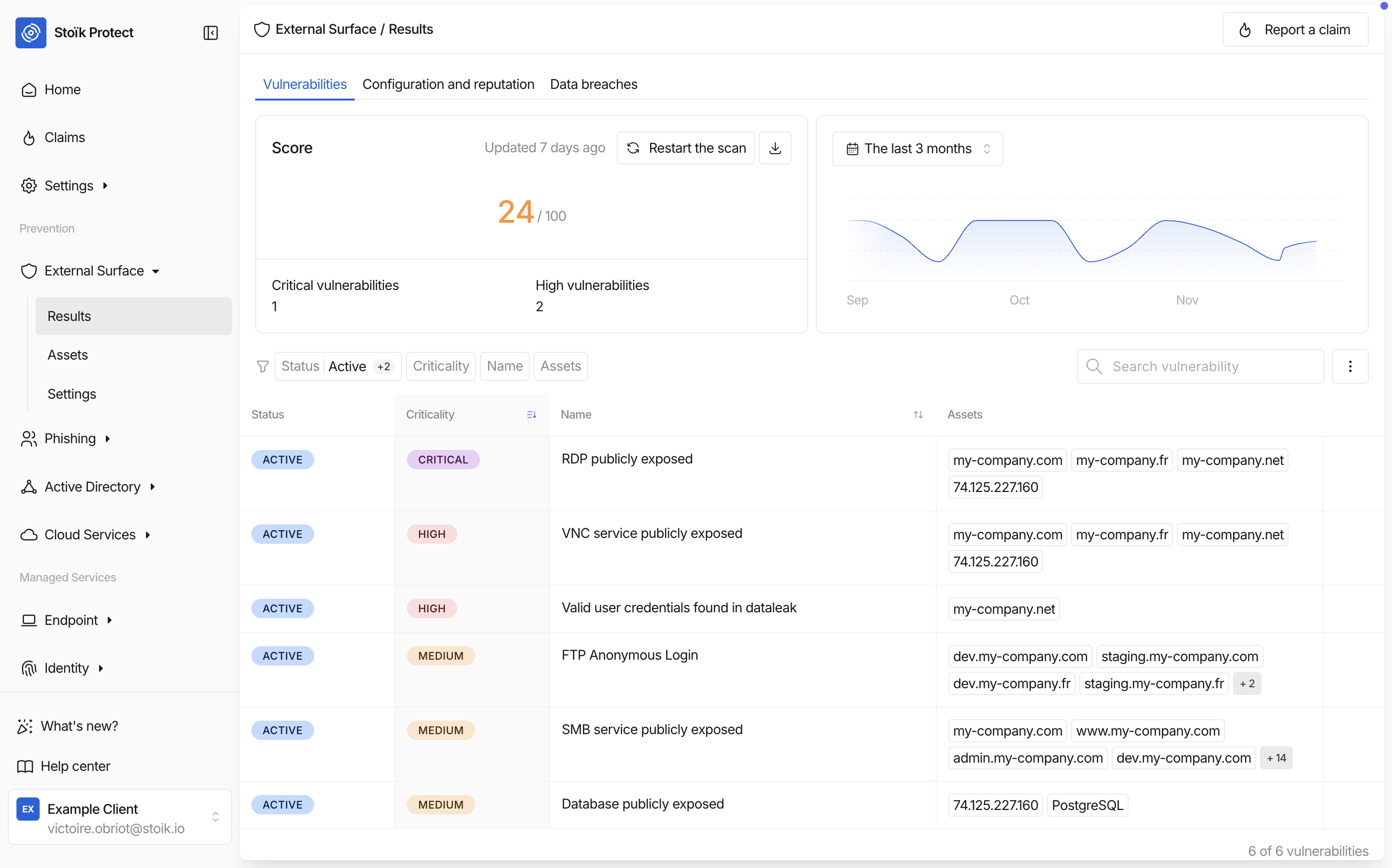
## Vulnerability & Asset Management Revamp
#### **Overview**
The vulnerability and asset management experience in **Stoïk Protect** has been completely redesigned to make it more intuitive and aligned with modern vulnerability management practices.
You can now discard vulnerabilities or assets, verify remediations, and track their lifecycle — all directly from Stoïk Protect.
#### **Why It Matters**
* **Simplified workflow:** Manage vulnerabilities and assets directly from your scan results.
* **Better visibility:** Understand the full lifecycle and review status of every vulnerability.
* **Faster handling:** Reduced manual review for Stoïk CERT — more automation for you.
#### **How It Works**
#### **1. Discard Vulnerabilities or Assets**
From your scan results in Stoïk Protect, you can now exclude items directly:
* Select a **vulnerability** or an **asset**.
* Click **Exclude** in the new sticky footer.
* Choose a discard reason:
* **Risk accepted**
* **Third-party risk**
* **False positive**
Depending on the severity:
* If the vulnerability is **CRITICAL/HIGH**, or linked to an asset that is, it will first be **reviewed by a CERT analyst**.
* Otherwise, it will be **automatically discarded**.
The status updates in real time as your request progresses.
#### **Verify Vulnerability Remediation**
When a patch has been applied, you can confirm it directly in Stoïk Protect:
* Select the vulnerability.
* Click **Verify**.
* Stoïk Protect automatically **re-launches a scan** for that asset.
If the issue is fixed, it disappears from the list and no longer impacts your risk score.
If not, it remains **Active** until resolved.
#### **Status Definitions**
| Status | Meaning |
| ------------------- | ---------------------------------------------------------------------------------------------- |
| **ACTIVE** | The vulnerability or asset is currently detected. |
| **CERT REVIEW** | Waiting for Stoïk CERT validation before discard is applied. |
| **TO BE DISMISSED** | Temporary state (2–3 minutes) before discard is finalized. |
| **DISMISSED** | The vulnerability/asset has been successfully discarded and remains visible in the main table. |
#### **What’s New**
| Improvement | Description |
| ---------------------------- | -------------------------------------------------------------------------------------------------- |
| **Simplified UX** | A new sticky footer with **Exclude** and **Verify** buttons replaces the old discard request flow. |
| **Clear discard categories** | Standardized reasons: Risk accepted, Third-party risk, False positive. |
| **More automatic discards** | Vulnerabilities below HIGH severity are now automatically discarded. |
| **Verify remediation flow** | Click **Verify** to re-scan and validate that a vulnerability is patched. |
| **Unified view** | Discarded vulnerabilities and assets now remain visible in the same table — no more separate tab. |
{% endupdate %}
{% update date="2025-10-14" %}
## MDR: Host Uninstallation from Stoïk Protect
#### **Overview**
You can now **uninstall MDR agents directly from Stoïk Protect** — whether your endpoints are protected by **CrowdStrike** or **SentinelOne**.
This enhancement gives you **full control** over your MDR lifecycle, from deployment to removal, without needing Stoïk assistance.
#### **Why It Matters**
* **Autonomy:** Manage agent removal directly from Stoïk Protect.
* **Security:** Maintain proper authorization via MFA and token validation where required.
* **Visibility:** Keep your endpoint inventory clean and up-to-date with clear host statuses.
#### **How It Works**
#### **1. Access the Host List**
* In **Stoïk Protect**, navigate to **Endpoints > Hosts**.
* Locate the host you want to uninstall.
#### **2. Initiate the Uninstallation**
* **MFA must have been enabled for at least 2 weeks** on your account to create a valid token.
* Click **Uninstall Agent** from the host’s action menu.
#### **3. Uninstall**
The uninstallation process varies according to your provider:
* **Uninstallation of CrowdStrike MDR agents** requires a manual action with a token
* **Uninstallation of SentinelOne MDR agents** is fully automated from Stoïk Protect
#### **3. a. Uninstall CrowdStrike Agents**
* The CrowdStrike uninstallation token is displayed in the pop-in
* You can follow those instructions to manually uninstall the agent, using this token
#### **3. b. Uninstall SentinelOne Agents**
* No token or manual steps are required.
* Stoïk Protect handles the entire removal flow automatically once you confirm the action.
#### **4. Monitor the Progress**
* The host’s status updates in real time:
* **Uninstalling** while the process runs.
* **Inactive** once the agent is fully removed and stops reporting.
#### **Host Statuses**
| Status | Description |
| ---------------- | --------------------------------------------------------------------- |
| **Active** | The agent is online and reporting normally. |
| **Uninstalling** | The uninstallation has been triggered from Stoïk Protect. |
| **Inactive** | The agent has been removed or hasn’t reported activity for 30 + days. |
| {% endupdate %} | |
{% update date="2025-10-08" %}
## Stoïk Protect Onboarding: To-do List
#### **Overview**
We’ve redesigned the onboarding experience in **Stoïk Protect** to make it clearer, more guided, and immediately actionable.
The former **Get Started** tab has been replaced with a **personalized To-do List** embedded directly into the **Home** tab, so every user knows exactly what to do next to get fully set up.
#### **Why It Matters**
* **Clarity:** The new onboarding checklist clearly shows where you stand in your Stoïk Protect setup.
* **Actionability:** Each task includes direct links to complete steps without leaving the dashboard.
* **Personalization:** The list adapts to your role and what’s already been configured for your organization.
* **Faster setup:** Teams reach full protection readiness in fewer steps and with less guesswork.
#### **How It Works**
#### 1. Access Your To-do List
Open **Stoïk Protect › Home** — your onboarding checklist appears at the top of the dashboard.
Each item represents an action required to complete your initial setup.
#### 2. Complete the Key Steps
| Step | Description |
| ----------------------------------- | ------------------------------------------------------------------------------------------------------------------------------------------------------- |
| **Invite your teammates** | Add all relevant colleagues and decision-makers to Stoïk Protect so everyone has access to dashboards and alerts. |
| **Join an onboarding session** | Choose between a **1:1 setup** session or a **bulk onboarding** flow depending on your company’s profile and number of endpoints. |
| **Activate your prevention tools** | Review which protection tools are not yet active. You can activate them directly or mark them as *not relevant* if already covered by another solution. |
| **Discover Stoïk Managed Services** | Book a call with a Stoïk Cyber Sales to learn how **MDR** and **Email Security** can strengthen your cyber-defense posture. |
#### 3. Track Your Progress
* Completed items are automatically checked off.
* Once all actions are complete, your organization’s onboarding status is marked **100 % Ready** in the dashboard.
#### **What’s New**
| Improvement | Description |
| ------------------------------------- | -------------------------------------------------------------------------------------------------------- |
| **Integrated onboarding in Home tab** | The old *Get Started* page has been retired — onboarding steps now live directly in your Home dashboard. |
| **Actionable checklist UX** | Quick-access buttons to *Invite*, *Join session*, *Activate*, and *Book a call*. |
| **Dynamic progress tracking** | The list updates in real time as steps are completed. |
| **Adaptive guidance** | Steps adjust automatically based on the client’s configuration and protection level. |
| {% endupdate %} | |
| {% endupdates %} | |
---
# Agent Instructions
This documentation is published with GitBook. GitBook is the documentation platform designed so that both humans and AI agents can read, navigate, and reason over technical content effectively. Learn more at gitbook.com.
## Querying This Documentation
If you need additional information that is not directly available in this page, you can query the documentation dynamically by asking a question.
Perform an HTTP GET request on the current page URL with the `ask` query parameter, and the optional `goal` query parameter:
```
GET https://docs.stoik.io/news/readme.md?ask=&goal=
```
`ask` is the immediate question: it should be specific, self-contained, and written in natural language.
`goal` is optional and describes the broader end goal you are ultimately trying to accomplish on behalf of the user. GitBook uses it to tailor the answer towards what is most useful for that goal.
The response will contain a direct answer to the question and relevant excerpts and sources from the documentation.
Use this mechanism when the answer is not explicitly present in the current page, you need clarification or additional context, or you want to retrieve related documentation sections.