> For the complete documentation index, see [llms.txt](https://docs.stoik.io/llms.txt). Markdown versions of documentation pages are available by appending `.md` to page URLs; this page is available as [Markdown](https://docs.stoik.io/cyber-best-practices/de/harten-sie-ihre-umgebung-ab/email-authentication/what-is-dmarc-and-how-do-i-configure-it.md).
# Was ist DMARC und wie konfiguriere ich es?
## Definition
DMARC (Domain-based Message Authentication, Reporting, and Conformance) ist ein E-Mail-Sicherheitsprotokoll, das auf SPF und DKIM basiert, um eine Domain vor Spoofing- und Phishing-Angriffen zu schützen.
Es ermöglicht Domaininhabern:
* Eine Richtlinie festzulegen, wie nicht authentifizierte E-Mails behandelt werden sollen (sollen sie akzeptiert, in Quarantäne verschoben oder abgelehnt werden?).
* Berichte über Versuche erhalten, ihre Domain betrügerisch zu verwenden.
Konkret prüft DMARC, ob jede empfangene E-Mail diese drei verschiedenen Filter besteht:
* SPF (die IP-Adresse des Absenders ist von der Domain autorisiert). Siehe [Was ist SPF und wie konfiguriere ich es?](/cyber-best-practices/de/harten-sie-ihre-umgebung-ab/email-authentication/what-is-spf-and-how-do-i-configure-it.md)
* DKIM (die kryptografische Signatur der Nachricht ist gültig).
* Ausrichtung (die in SPF/DKIM verwendeten Domains stimmen mit der in der Adresse des Absenders angezeigten überein).
Wenn die E-Mail diese Prüfungen nicht besteht, wendet der empfangende Server die von der sendenden Domain definierte DMARC-Richtlinie an.
Hier ist ein Beispiel für eine DMARC-Richtliniendefinition: `_dmarc.yourdomain.com IN TXT "v=DMARC1; p=reject; rua=mailto:report@yourdomain.com"`.
* `v=DMARC1`: die DMARC-Version.
* `p=reject`: die angewendete Richtlinie. Hier bedeutet "reject", dass E-Mails, die die oben genannten drei Filter nicht bestehen, abgelehnt werden, d. h. nicht im Postfach empfangen werden.
* `rua=mailto:...`: die Adresse, an die aggregierte Berichte gesendet werden.
## Konfiguration
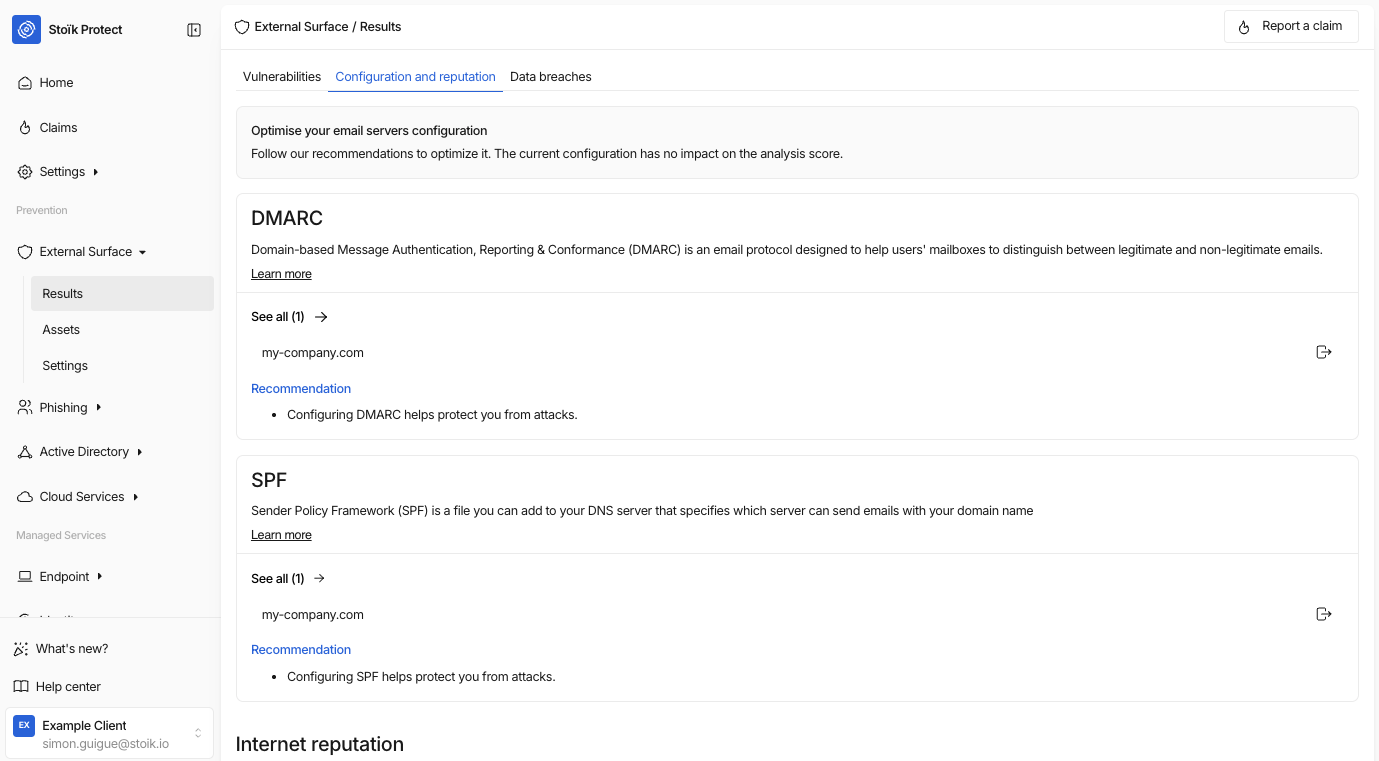
Gehen Sie zu `Externer Scan` > `Ergebnisse` > `Konfiguration und Reputation` um Ihre DMARC-Daten zu finden.
Dann klicken Sie auf `Alle anzeigen` am Ende der Seite: Dort finden Sie falsch konfigurierte Domains sowie Installationsanleitungen, je nachdem, ob Sie Google oder Microsoft verwenden.
{% hint style="info" %}
Stoïk betrachtet einen DMARC-Eintrag als korrekt konfiguriert, wenn die gewählte Richtlinie "p=reject" oder "p=quarantine" ist.
{% endhint %}
Zusätzlich verwendet der External Scan einen Cache, dessen Aktualisierung ungefähr 6 bis 7 Tage dauert; daher müssen Sie möglicherweise bis zu einer Woche warten, bis die Ergebnisse aktualisiert werden. Wenn alles in Ordnung zu sein scheint, das Problem jedoch weiterhin besteht, kontaktieren Sie uns bitte unter .
---
# Agent Instructions
This documentation is published with GitBook. GitBook is the documentation platform designed so that both humans and AI agents can read, navigate, and reason over technical content effectively. Learn more at gitbook.com.
## Querying This Documentation
If you need additional information that is not directly available in this page, you can query the documentation by asking a question.
Perform an HTTP GET request on the following URL with the `ask` and `goal` query parameters:
```
GET https://docs.stoik.io/cyber-best-practices/de/harten-sie-ihre-umgebung-ab/email-authentication/what-is-dmarc-and-how-do-i-configure-it.md?ask=&goal=
```
`ask` is the immediate question: it should be specific, self-contained, and written in natural language.
`goal` is what the user is ultimately trying to achieve, the reason they need the answer. Sharing it helps GitBook give you a better, more relevant answer. A goal is most helpful when it describes the outcome the user wants rather than restating the question. For example, with `ask=how do I create an API token`, a goal like `automate deployments from our CI pipeline` lets GitBook tailor the answer to that use case.
The response will contain a direct answer to the question and relevant excerpts and sources from the documentation.
Use this mechanism when the answer is not explicitly present in the current page, you need clarification or additional context, or you want to retrieve related documentation sections.