> For the complete documentation index, see [llms.txt](https://docs.stoik.io/llms.txt). Markdown versions of documentation pages are available by appending `.md` to page URLs; this page is available as [Markdown](https://docs.stoik.io/cyber-best-practices/de/harten-sie-ihre-umgebung-ab/email-authentication/what-is-spf-and-how-do-i-configure-it.md).
# Was ist SPF und wie konfiguriere ich es?
## SPF-Definition
Sender Policy Framework (SPF) ist ein E-Mail-Sicherheitsprotokoll, das zur Bekämpfung von Spam und E-Mail-Spoofing verwendet wird.
Konkret ermöglicht SPF einer Domain (z. B. yoursite.com), in ihren DNS-Einträgen festzulegen, welche Server berechtigt sind, E-Mails in ihrem Namen zu senden. Wenn ein Mailserver eine E-Mail erhält, die vorgibt, von yoursite.com zu stammen, prüft er, ob der sendende Server auf dieser Liste der autorisierten Server steht.
Wenn Sie beispielsweise Gmail oder einen Dienst wie Mailchimp zum Senden Ihrer E-Mails verwenden, lautet Ihr SPF-Eintrag: „Nur Gmail- oder Mailchimp-Server dürfen E-Mails im Namen meiner Domain senden.“
## Konfiguration
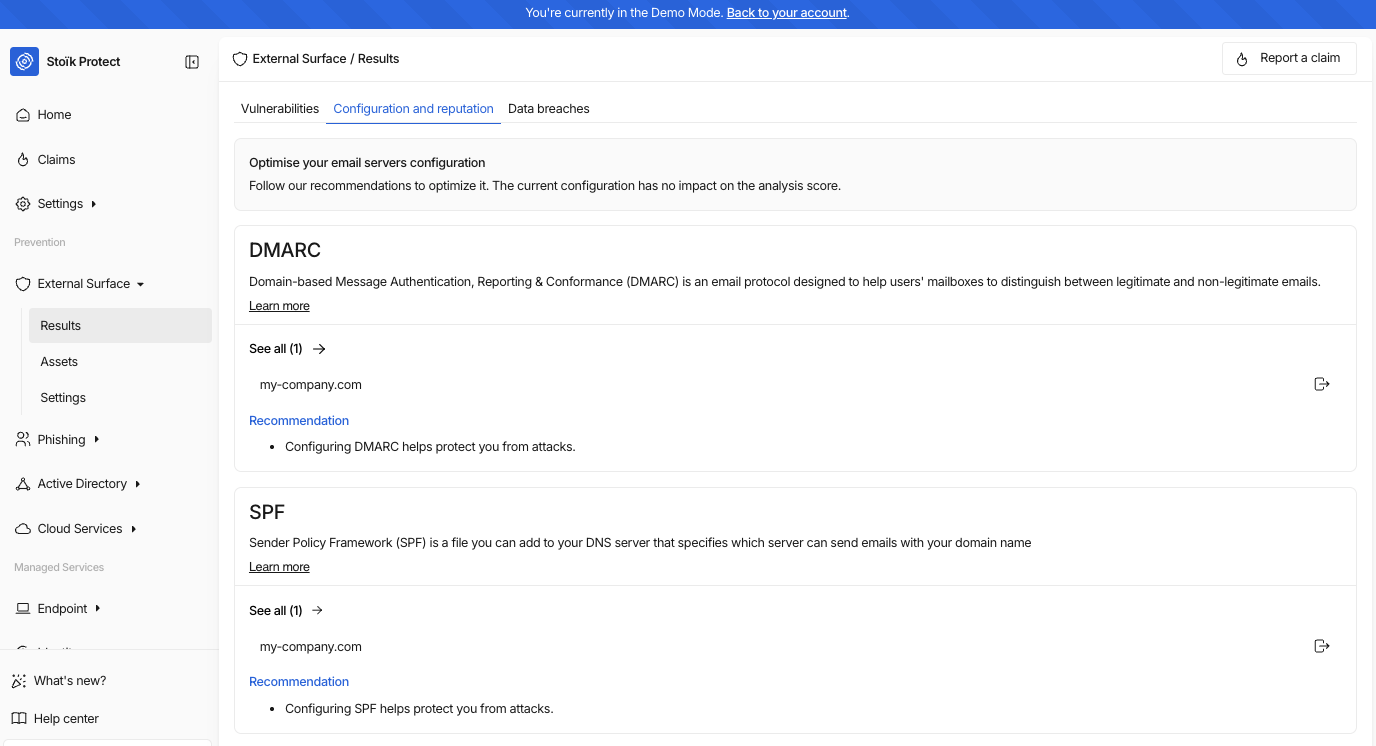
Gehen Sie zu `Externer Scan` > `Ergebnisse` > `Konfiguration und Reputation` um Ihre SPF-Daten zu finden.
Dann klicken Sie auf `Alle anzeigen` am Ende der Seite: Dort finden Sie falsch konfigurierte Domains sowie Installationsanleitungen, je nachdem, ob Sie Google oder Microsoft verwenden.
---
# Agent Instructions
This documentation is published with GitBook. GitBook is the documentation platform designed so that both humans and AI agents can read, navigate, and reason over technical content effectively. Learn more at gitbook.com.
## Querying This Documentation
If you need additional information that is not directly available in this page, you can query the documentation by asking a question.
Perform an HTTP GET request on the following URL with the `ask` and `goal` query parameters:
```
GET https://docs.stoik.io/cyber-best-practices/de/harten-sie-ihre-umgebung-ab/email-authentication/what-is-spf-and-how-do-i-configure-it.md?ask=&goal=
```
`ask` is the immediate question: it should be specific, self-contained, and written in natural language.
`goal` is what the user is ultimately trying to achieve, the reason they need the answer. Sharing it helps GitBook give you a better, more relevant answer. A goal is most helpful when it describes the outcome the user wants rather than restating the question. For example, with `ask=how do I create an API token`, a goal like `automate deployments from our CI pipeline` lets GitBook tailor the answer to that use case.
The response will contain a direct answer to the question and relevant excerpts and sources from the documentation.
Use this mechanism when the answer is not explicitly present in the current page, you need clarification or additional context, or you want to retrieve related documentation sections.