# \[FR] How to notify the CNIL in the event of a data breach?
In the event of a data breach, we recommend that you notify the CNIL as soon as possible.
1. Go to the [CNIL website](https://notifications.cnil.fr/notifications/violation);
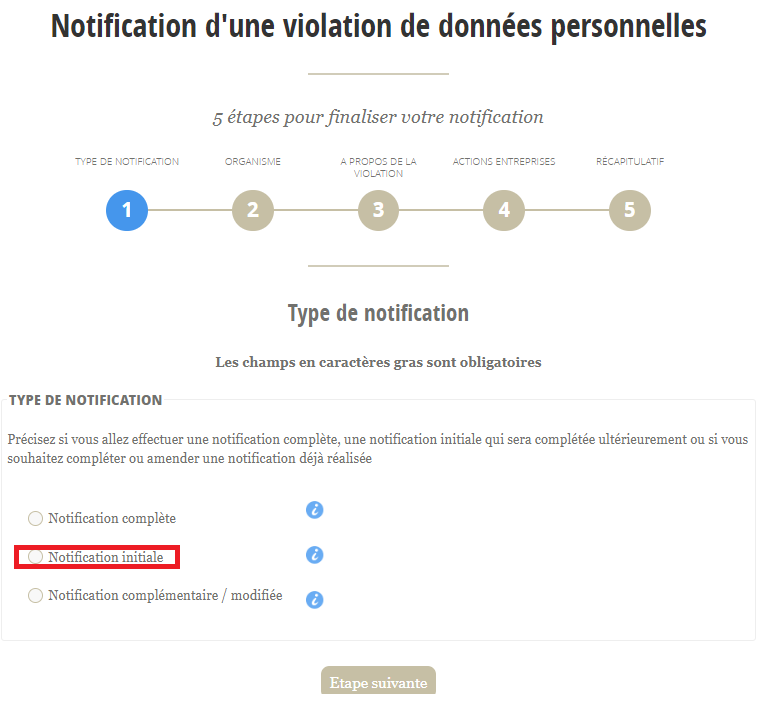
2. Select "Initial notification". You can return to your notification as you gather more information:
3. Enter your SIREN number.
1. If you do not have a SIREN number, tick the red box:
\
Remember to complete all the fields below:
\
:warning: The contact person is sometimes different from the legal representative. If it is the same person, you must still complete both sections:
4\. On this page, you will need to provide as much detail as possible, even if it is only the initial notification.
{% hint style="info" %}
As a reminder, you can come back to these items once you have the missing information.\
\
If you are unable to fill in all the relevant sections at this stage, we recommend that you only fill in the ones you know and come back to them later.
{% endhint %}
5. With regard to the potential consequences, you should indicate your interpretation of the situation. You can adapt this as the situation evolves and based on feedback from the CNIL.
6. At this stage, you will see a summary of all the information you have entered. Check that all the information is correct before confirming:
7. Once you have validated this step, you will receive confirmation of your notification by email. You will be offered the option to download a PDF version of this notification. We recommend that you download it while you wait to receive the email, as this PDF will not be sent:
8. Your notification has been taken into account. The CNIL will get back to you with the follow-up action taken on your notification.
---
# Agent Instructions: Querying This Documentation
If you need additional information that is not directly available in this page, you can query the documentation dynamically by asking a question.
Perform an HTTP GET request on the current page URL with the `ask` query parameter:
```
GET https://docs.stoik.io/cyberattack/fr-how-to-notify-the-cnil-in-the-event-of-a-data-breach.md?ask=
```
The question should be specific, self-contained, and written in natural language.
The response will contain a direct answer to the question and relevant excerpts and sources from the documentation.
Use this mechanism when the answer is not explicitly present in the current page, you need clarification or additional context, or you want to retrieve related documentation sections.
.png)
.png)
.png)
.png)
.png)
.png)
.png)