> For the complete documentation index, see [llms.txt](https://docs.stoik.io/llms.txt). Markdown versions of documentation pages are available by appending `.md` to page URLs; this page is available as [Markdown](https://docs.stoik.io/help/help-center-en-es/herramientas-de-prevencion/cloud-scan/aws.md).
# Configuración: AWS
Concede al análisis en la nube acceso de solo lectura a una cuenta de AWS creando una política y un rol, y luego pegando el ARN del rol en Stoïk Protect.
## Requisitos previos
* Una cuenta de administrador en la cuenta de AWS que se va a analizar.
* Si utilizas AWS Organizations, tus Service Control Policies (SCP) no deben bloquear los permisos de solo lectura siguientes. Las SCP son la causa más común de fallos de configuración, consulta [Solución de problemas](#troubleshooting).
* Se requiere un asesor técnico para la supervisión continua y la remediación de vulnerabilidades.
* Una sola persona realiza toda la configuración, de principio a fin: un usuario de Stoïk Protect autorizado para editar herramientas de prevención, que además es administrador de la cuenta de AWS.
## Configuración
{% stepper %}
{% step %}
### Selecciona Amazon Web Services
Ve a `Cloud Scan` > `Configuración`, haz clic en `Nuevo proveedor`, y selecciona `AWS`.
{% endstep %}
{% step %}
### Crear una nueva política
#### Configura la política
1. Vaya al [Creador de políticas de AWS](https://console.aws.amazon.com/iam/home?#/policies$new?step=edit) e inicie sesión con su cuenta de administrador.
2. Haz clic en la pestaña `JSON` y pega la siguiente política en el editor:
```json
{
"Version": "2012-10-17",
"Statement": [
{
"Effect": "Allow",
"Action": [
"ecr:BatchGetRepositoryScanningConfiguration",
"ecr:DescribeImageScanFindings",
"ecr:DescribeImages",
"dynamodb:ListTagsOfResource",
"ecr:ListTagsForResource",
"inspector2:BatchGet*",
"inspector2:Get*",
"inspector2:Describe*",
"inspector2:List*",
"sqs:ListQueueTags",
"sso:Describe*",
"sso:List*"
],
"Resource": "*"
},
{
"Effect": "Deny",
"Action": [
"datapipeline:EvaluateExpression",
"datapipeline:QueryObjects",
"rds:DownloadDBLogFilePortion"
],
"Resource": "*"
}
]
}
```
3. Haga clic en `Siguiente`.
#### Guarda la política
1. Nombra la política `StoikAdditionalPermissions`.
2. Haga clic en `Crear política`.
{% endstep %}
{% step %}
### Crear un nuevo rol
#### Configura la confianza del rol
1. Vaya al [Creador de roles de AWS](https://us-east-1.console.aws.amazon.com/iamv2/home#/roles/create?step=selectEntities).
2. Haga clic en `Cuenta de AWS`, y luego `Otra cuenta de AWS`, e introduce el siguiente ID de cuenta:
```
436578779424
```
3. Seleccionar `Requiere ID externo` y copia el valor que se muestra en la consola de Stoïk Protect.
4. Haga clic en `Siguiente`.
#### Asigna permisos y finaliza
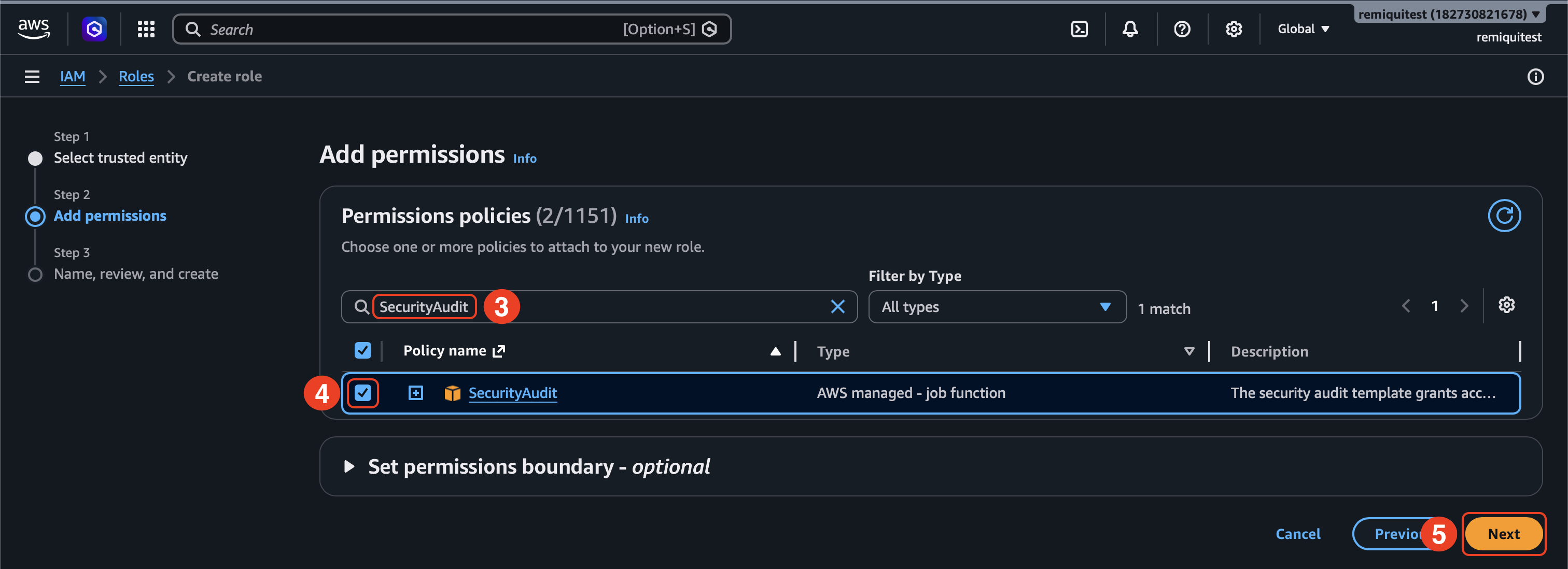
1. Seleccionar `StoikAdditionalPermissions` y `SecurityAudit` como permisos.
2. Haga clic en `Siguiente`.
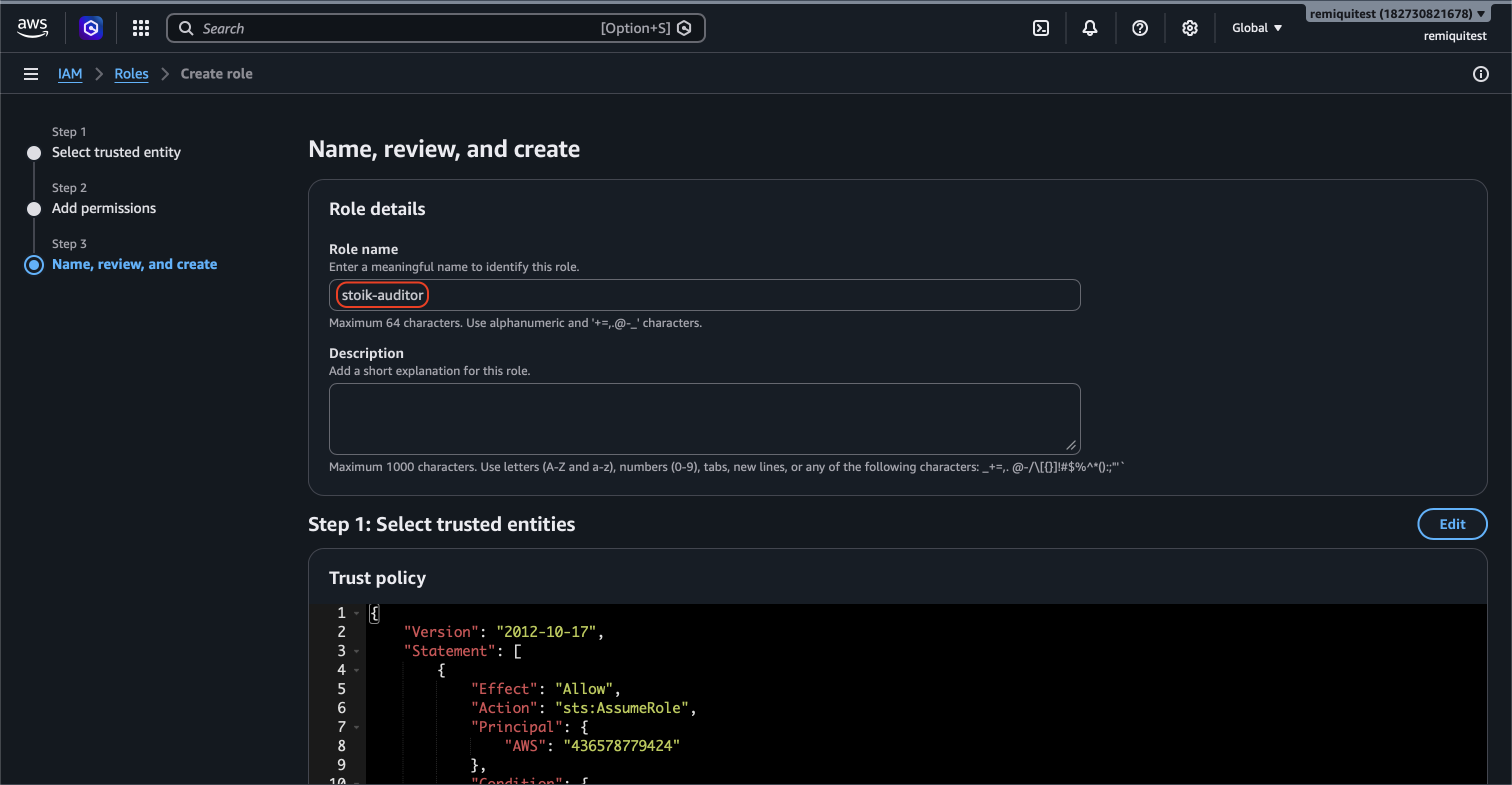
3. Introduce `stoik-auditor` como nombre del rol.
4. Haga clic en `Crear rol`.
{% endstep %}
{% step %}
### Añade un identificador ARN
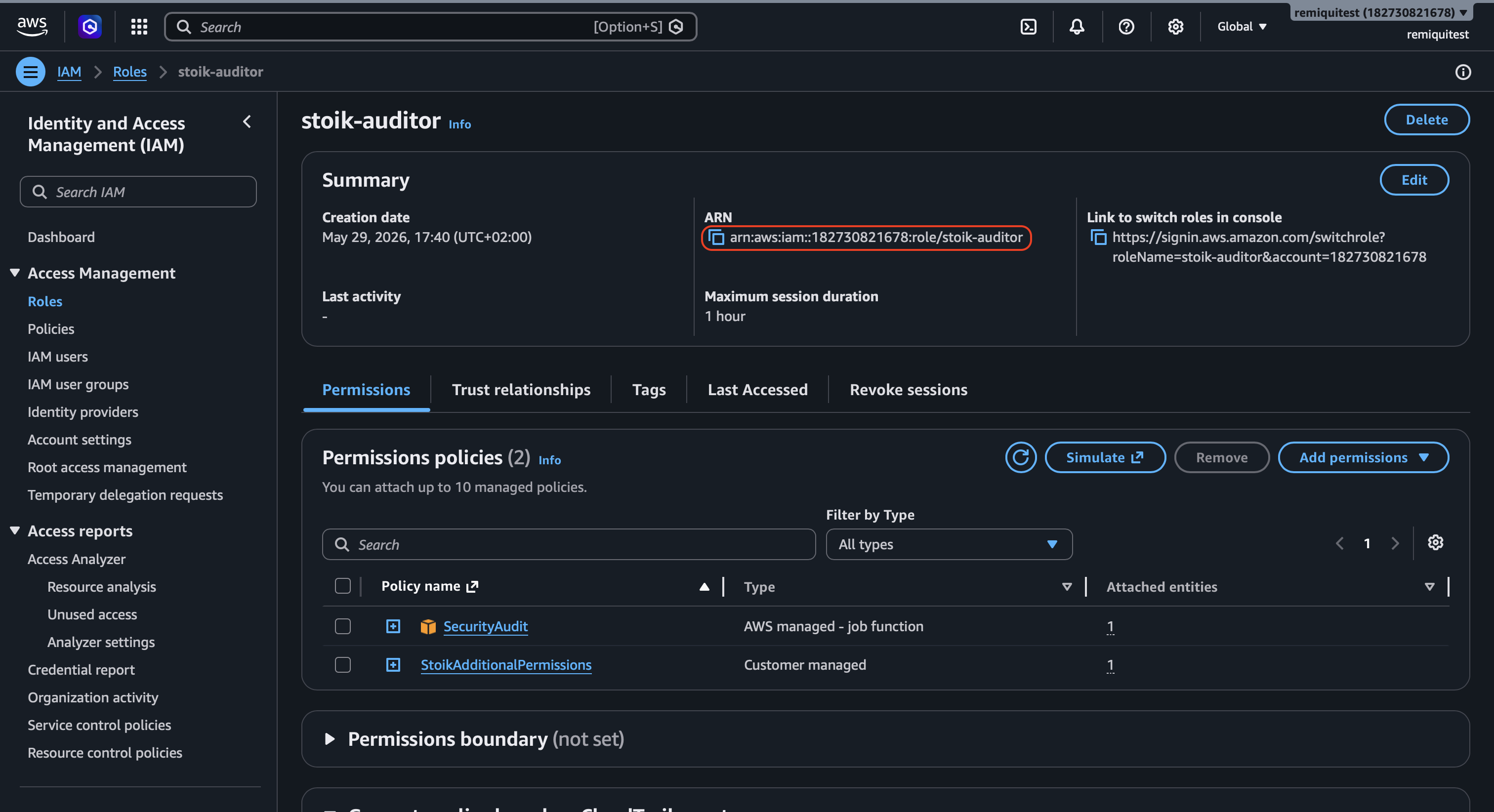
1. Vaya al `stoik-auditor` del rol que acabas de crear.
2. Copia la referencia `ARN` .
{% endstep %}
{% step %}
### Complete la configuración
1. Pega la `ARN` referencia en el campo dedicado de la consola de Stoïk Protect.
2. Haga clic en `Completar configuración`.
{% hint style="info" %}
Actualice la página de Stoïk Protect si es necesario.
{% endhint %}
{% endstep %}
{% endstepper %}
## AWS Organizations
Con AWS Organizations, crea el `stoik-auditor` rol en cada cuenta miembro que quieras analizar, no solo en la cuenta de administración. Todos los permisos solicitados son de solo lectura: la `SecurityAudit` política administrada por AWS más `StoikAdditionalPermissions`. No hay un conjunto más pequeño.
## Solución de problemas
"La integración con AWS falló" / "No se puede asumir el rol"
Comprueba esto en orden, empezando por lo más común:
1. **ID externo:** el valor en Stoïk Protect debe coincidir exactamente con el `sts:ExternalId` en la política de confianza del rol. La distinción entre mayúsculas y minúsculas, y los espacios, cuentan. Un ID externo de un intento anterior también falla.
2. **Cuenta de confianza:** la política de confianza confía en la cuenta `436578779424`.
3. **Rol:** `stoik-auditor` existe en esa cuenta, y el ARN pegado en Stoïk Protect es su ARN. Para un rol que no existe, AWS responde "acceso denegado", no "no encontrado".
4. **Políticas:** ambas `SecurityAudit` y `StoikAdditionalPermissions` están adjuntas, y la última coincide con el JSON anterior. Las configuraciones antiguas suelen carecer de `sso:Describe*` y `sso:List*`.
Todo es correcto, pero la configuración sigue diciendo "los roles no están configurados correctamente"
Esto suele ser una Service Control Policy (SCP). Antes de aceptar una cuenta, Stoïk comprueba su rol con el simulador de permisos de AWS, y algunas SCP hacen que ese simulador rechace todos los permisos, aunque el análisis real funcione. Ponte en contacto con con tu ID de cuenta de AWS.
El análisis funcionó y luego se detuvo
Algo cambió de tu lado: se eliminó o renombró el rol, se desasoció una política, cambió el ID externo o se añadió una nueva SCP. Revisa las cuatro comprobaciones en ["La integración con AWS falló" / "No se puede asumir el rol"](#integration-with-aws-failed--unable-to-assume-role).
---
# Agent Instructions
This documentation is published with GitBook. GitBook is the documentation platform designed so that both humans and AI agents can read, navigate, and reason over technical content effectively. Learn more at gitbook.com.
## Querying This Documentation
If you need additional information that is not directly available in this page, you can query the documentation by asking a question.
Perform an HTTP GET request on the following URL with the `ask` and `goal` query parameters:
```
GET https://docs.stoik.io/help/help-center-en-es/herramientas-de-prevencion/cloud-scan/aws.md?ask=&goal=
```
`ask` is the immediate question: it should be specific, self-contained, and written in natural language.
`goal` is what the user is ultimately trying to achieve, the reason they need the answer. Sharing it helps GitBook give you a better, more relevant answer. A goal is most helpful when it describes the outcome the user wants rather than restating the question. For example, with `ask=how do I create an API token`, a goal like `automate deployments from our CI pipeline` lets GitBook tailor the answer to that use case.
The response will contain a direct answer to the question and relevant excerpts and sources from the documentation.
Use this mechanism when the answer is not explicitly present in the current page, you need clarification or additional context, or you want to retrieve related documentation sections.