> For the complete documentation index, see [llms.txt](https://docs.stoik.io/llms.txt). Markdown versions of documentation pages are available by appending `.md` to page URLs; this page is available as [Markdown](https://docs.stoik.io/help/help-de/praventionstools/cloud-scan/aws.md).
# Einrichtung: AWS
Gewähren Sie dem Cloud-Scan Lesezugriff auf ein AWS-Konto, indem Sie eine Richtlinie und eine Rolle erstellen und anschließend die ARN der Rolle in Stoïk Protect einfügen.
## Voraussetzungen
* Ein Administratorkonto auf dem zu scannenden AWS-Konto.
* Wenn Sie AWS Organizations verwenden, dürfen Ihre Service Control Policies (SCPs) die untenstehenden Nur-Lese-Berechtigungen nicht blockieren. SCPs sind die häufigste Ursache für Einrichtungsfehler, siehe [Fehlerbehebung](#troubleshooting).
* Für die laufende Überwachung und Behebung von Schwachstellen ist ein technischer Berater erforderlich.
* Eine Person führt die gesamte Einrichtung von Anfang bis Ende durch: ein Stoïk-Protect-Benutzer, der berechtigt ist, Präventionswerkzeuge zu bearbeiten, und der außerdem Administrator des AWS-Kontos ist.
## Einrichtung
{% stepper %}
{% step %}
### Wählen Sie Amazon Web Services aus
Gehen Sie zu `Cloud Scan` > `Einstellungen`, klicken Sie auf `Neuer Anbieter`, und wählen Sie `AWS`.
{% endstep %}
{% step %}
### Eine neue Richtlinie erstellen
#### Richtlinie konfigurieren
1. Gehen Sie zum [AWS-Richtlinienersteller](https://console.aws.amazon.com/iam/home?#/policies$new?step=edit) und melden Sie sich mit Ihrem Administratorkonto an.
2. Klicken Sie auf die `JSON` Registerkarte und fügen Sie die folgende Richtlinie in den Editor ein:
```json
{
"Version": "2012-10-17",
"Statement": [
{
"Effect": "Allow",
"Action": [
"ecr:BatchGetRepositoryScanningConfiguration",
"ecr:DescribeImageScanFindings",
"ecr:DescribeImages",
"dynamodb:ListTagsOfResource",
"ecr:ListTagsForResource",
"inspector2:BatchGet*",
"inspector2:Get*",
"inspector2:Describe*",
"inspector2:List*",
"sqs:ListQueueTags",
"sso:Describe*",
"sso:List*"
],
"Resource": "*"
},
{
"Effect": "Deny",
"Action": [
"datapipeline:EvaluateExpression",
"datapipeline:QueryObjects",
"rds:DownloadDBLogFilePortion"
],
"Resource": "*"
}
]
}
```
3. Klicken Sie auf `Weiter`.
#### Speichern Sie die Richtlinie
1. Benennen Sie die Richtlinie `StoikAdditionalPermissions`.
2. Klicken Sie auf `Richtlinie erstellen`.
{% endstep %}
{% step %}
### Eine neue Rolle erstellen
#### Vertrauen der Rolle konfigurieren
1. Gehen Sie zum [AWS-Rollenersteller](https://us-east-1.console.aws.amazon.com/iamv2/home#/roles/create?step=selectEntities).
2. Klicken Sie auf `AWS-Konto`, dann auf `Ein weiteres AWS-Konto`, und geben Sie die folgende Konto-ID ein:
```
436578779424
```
3. Auswählen `Externes ID erforderlich` und kopieren Sie den in der Stoïk-Protect-Konsole angezeigten Wert.
4. Klicken Sie auf `Weiter`.
#### Berechtigungen zuweisen und abschließen
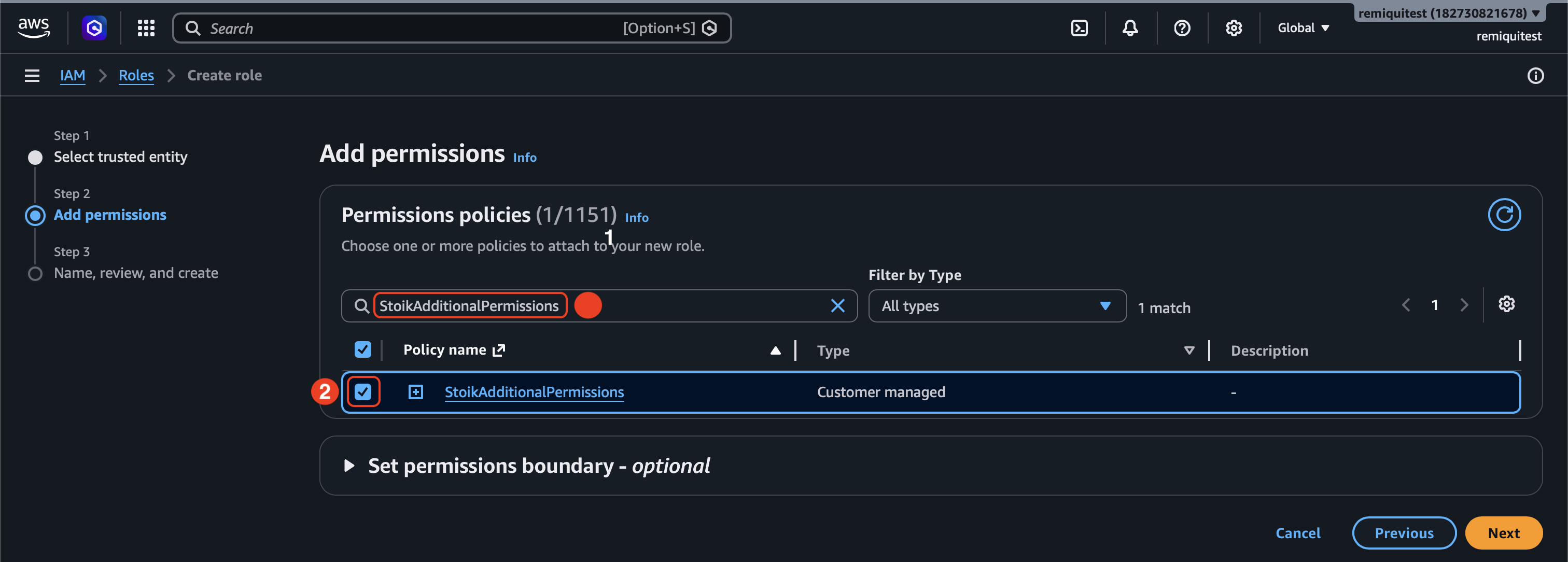
1. Auswählen `StoikAdditionalPermissions` und `SecurityAudit` als Berechtigungen.
2. Klicken Sie auf `Weiter`.
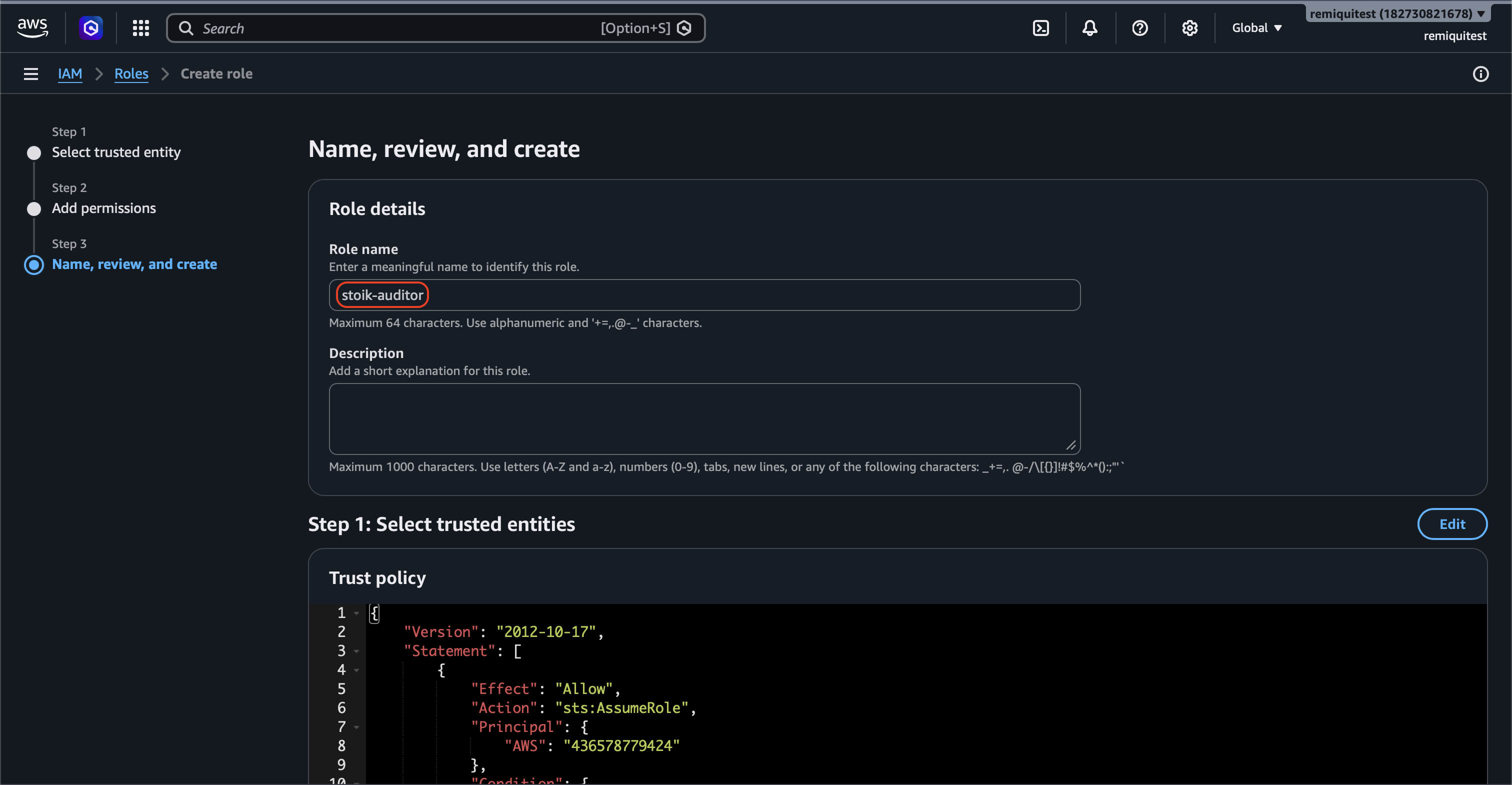
3. Geben Sie `stoik-auditor` als Rollennamen ein.
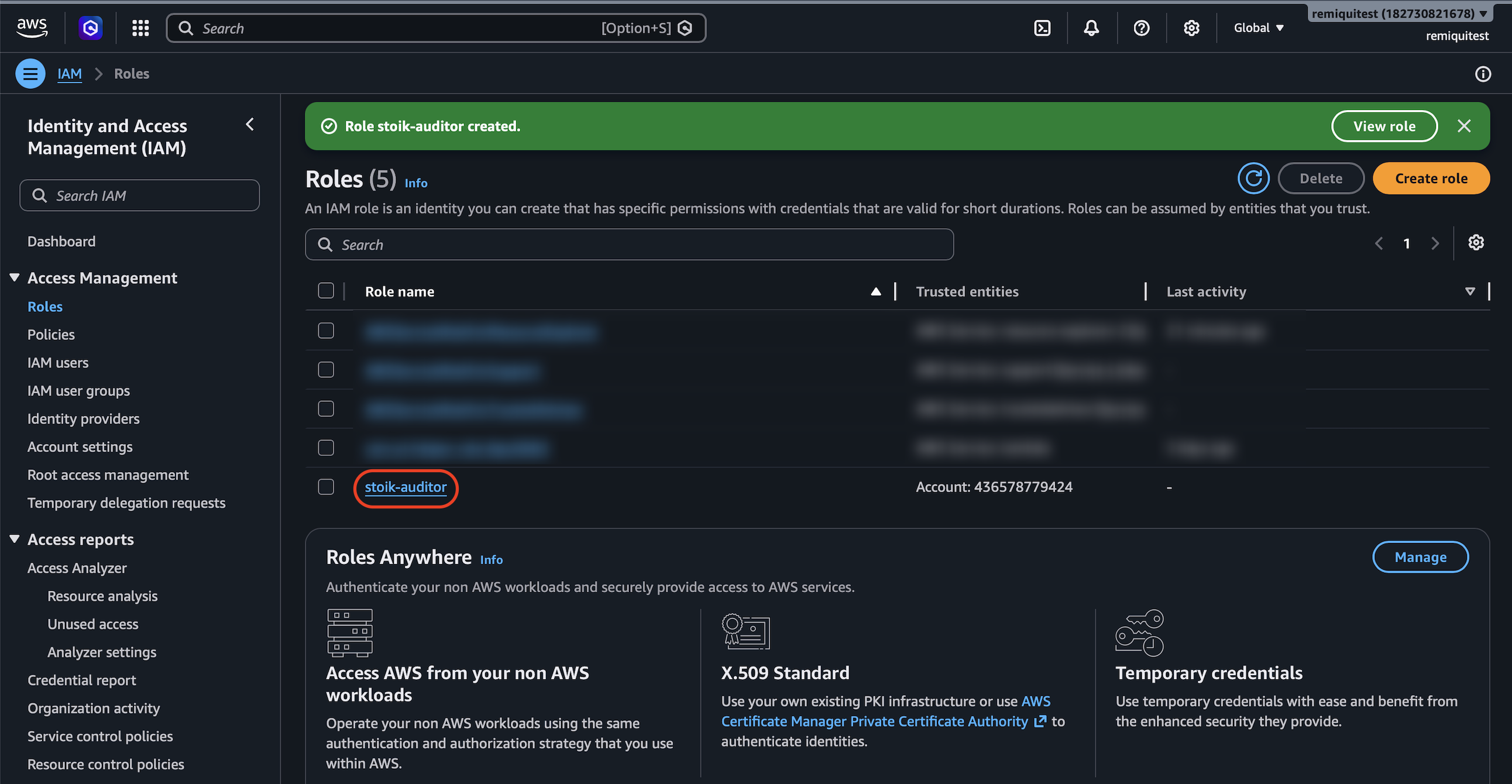
4. Klicken Sie auf `Rolle erstellen`.
{% endstep %}
{% step %}
### Eine ARN-Kennzeichnung hinzufügen
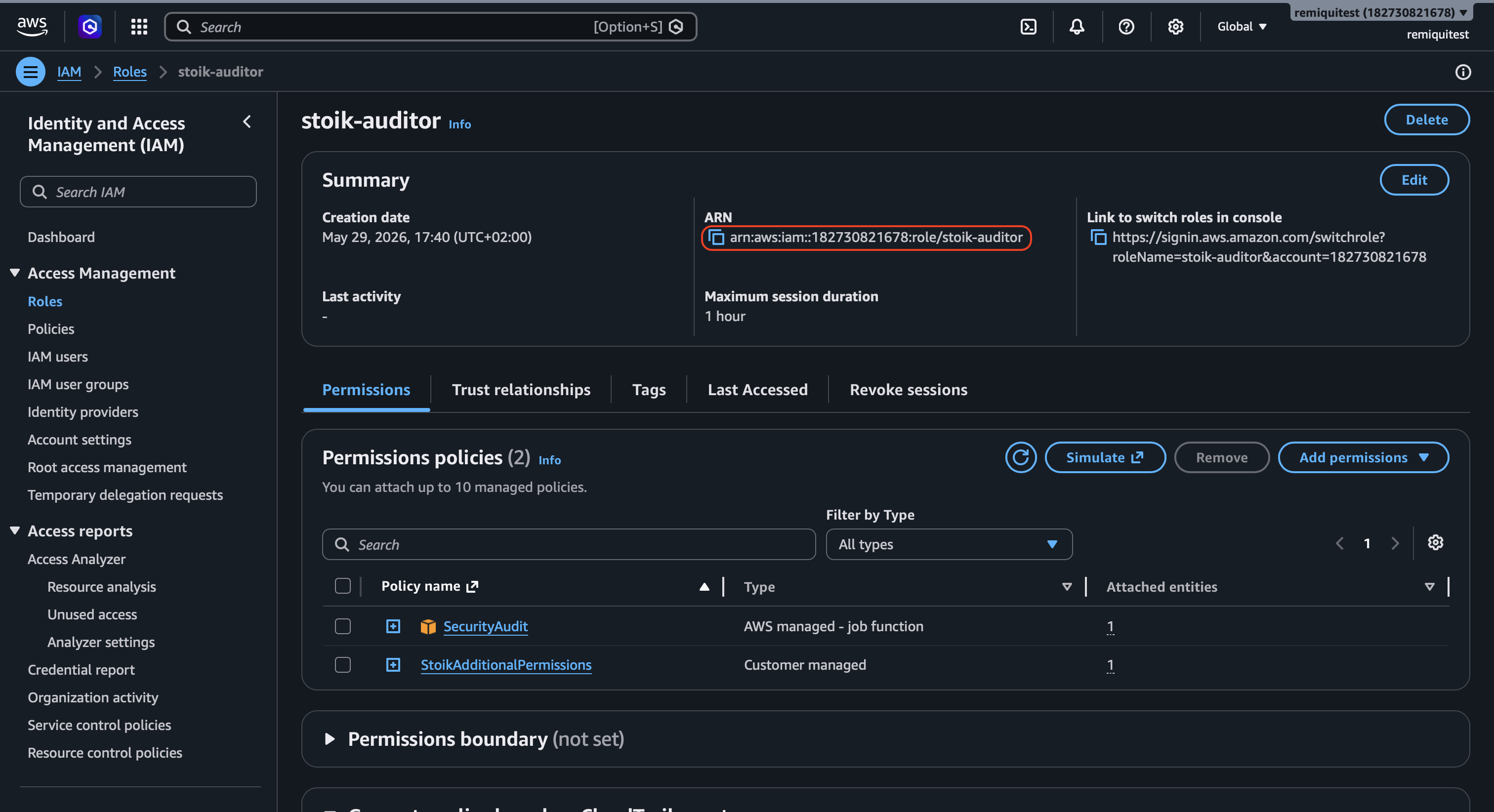
1. Gehen Sie zum `stoik-auditor` Rolle, die Sie gerade erstellt haben.
2. Kopieren Sie die `ARN` Referenz.
{% endstep %}
{% step %}
### Einrichtung abschließen
1. Fügen Sie die `ARN` Referenz in das dafür vorgesehene Feld in der Stoïk-Protect-Konsole ein.
2. Klicken Sie auf `Einrichtung abschließen`.
{% hint style="info" %}
Aktualisieren Sie bei Bedarf die Stoïk Protect-Seite.
{% endhint %}
{% endstep %}
{% endstepper %}
## AWS Organizations
Erstellen Sie mit AWS Organizations die `stoik-auditor` Rolle in jedem Mitgliedskonto, das Sie scannen möchten, nicht nur im Verwaltungskonto. Alle angeforderten Berechtigungen sind nur lesend: die von AWS verwaltete `SecurityAudit` Richtlinie plus `StoikAdditionalPermissions`. Es gibt keine kleinere Menge.
## Fehlerbehebung
"Integration mit AWS fehlgeschlagen" / "Rolle kann nicht übernommen werden"
Prüfen Sie diese der Reihe nach, beginnend mit den häufigsten:
1. **Externe ID:** der Wert in Stoïk Protect muss genau mit dem `sts:ExternalId` in der Vertrauensrichtlinie der Rolle übereinstimmen. Groß-/Kleinschreibung und Leerzeichen sind relevant. Auch eine externe ID aus einem früheren Versuch schlägt fehl.
2. **Vertrauenswürdiges Konto:** die Vertrauensrichtlinie vertraut Konto `436578779424`.
3. **Rolle:** `stoik-auditor` existiert in diesem Konto, und die in Stoïk Protect eingefügte ARN ist ihre ARN. Für eine nicht vorhandene Rolle antwortet AWS mit "Zugriff verweigert" und nicht mit "nicht gefunden".
4. **Richtlinien:** beide `SecurityAudit` und `StoikAdditionalPermissions` sind angehängt, und die letztere entspricht dem obigen JSON. Ältere Setups fehlen oft `sso:Describe*` und `sso:List*`.
Alles ist korrekt, aber die Einrichtung meldet weiterhin "Rollen nicht korrekt konfiguriert"
Das ist normalerweise eine Service Control Policy (SCP). Bevor Stoïk ein Konto akzeptiert, prüft es dessen Rolle mit dem Berechtigungssimulator von AWS, und einige SCPs bewirken, dass dieser Simulator jede Berechtigung verweigert, obwohl der eigentliche Scan funktioniert. Kontaktieren Sie mit Ihrer AWS-Konto-ID.
Der Scan hat funktioniert und ist dann gestoppt
Auf Ihrer Seite hat sich etwas geändert: Die Rolle wurde gelöscht oder umbenannt, eine Richtlinie wurde entfernt, die externe ID wurde geändert oder eine neue SCP wurde hinzugefügt. Gehen Sie die vier Prüfungen in ["Integration mit AWS fehlgeschlagen" / "Rolle kann nicht übernommen werden"](#integration-with-aws-failed--unable-to-assume-role).
---
# Agent Instructions
This documentation is published with GitBook. GitBook is the documentation platform designed so that both humans and AI agents can read, navigate, and reason over technical content effectively. Learn more at gitbook.com.
## Querying This Documentation
If you need additional information that is not directly available in this page, you can query the documentation by asking a question.
Perform an HTTP GET request on the following URL with the `ask` and `goal` query parameters:
```
GET https://docs.stoik.io/help/help-de/praventionstools/cloud-scan/aws.md?ask=&goal=
```
`ask` is the immediate question: it should be specific, self-contained, and written in natural language.
`goal` is what the user is ultimately trying to achieve, the reason they need the answer. Sharing it helps GitBook give you a better, more relevant answer. A goal is most helpful when it describes the outcome the user wants rather than restating the question. For example, with `ask=how do I create an API token`, a goal like `automate deployments from our CI pipeline` lets GitBook tailor the answer to that use case.
The response will contain a direct answer to the question and relevant excerpts and sources from the documentation.
Use this mechanism when the answer is not explicitly present in the current page, you need clarification or additional context, or you want to retrieve related documentation sections.