> For the complete documentation index, see [llms.txt](https://docs.stoik.io/llms.txt). Markdown versions of documentation pages are available by appending `.md` to page URLs; this page is available as [Markdown](https://docs.stoik.io/help/help-de/mdr/management/hosts.md).

# Host-Tabelle

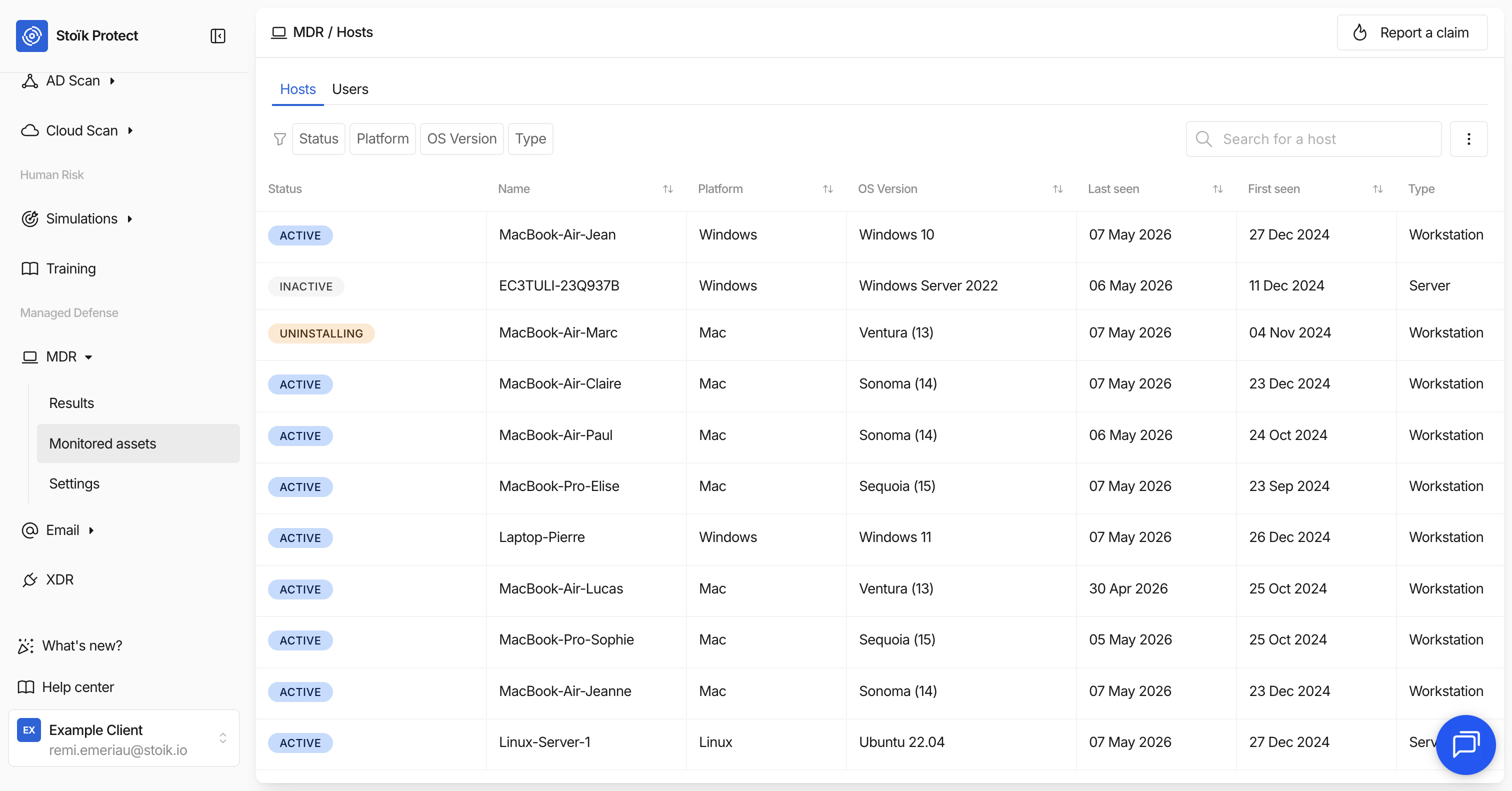
Das `MDR` > `Überwachte Assets` > `Hosts` Diese Seite listet alle Endpunkte (Workstations, Server und mobile Geräte) auf, die vom MDR-Service überwacht werden. Jeder Host ist ein Gerät, auf dem ein EDR-Agent (CrowdStrike, SentinelOne oder Microsoft Defender) bereitgestellt wurde.

<figure><img src="https://243136008-files.gitbook.io/~/files/v0/b/gitbook-x-prod.appspot.com/o/spaces%2FaDGGQ49Oui29Ft0kJjSm%2Fuploads%2Fgit-blob-0f3fd4b18a821c491cd0d38912c289ea2a0b9bf9%2FCapture%20d%E2%80%99%C3%A9cran%202026-05-07%20%C3%A0%2015.33.07.png?alt=media" alt=""><figcaption></figcaption></figure>

## Spalten

Jede Zeile in der Tabelle zeigt die folgenden Informationen an:

<table><thead><tr><th width="164.3984375">Spalte</th><th>Beschreibung</th></tr></thead><tbody><tr><td><strong>Status</strong></td><td>Ob der Host <strong>Aktiv</strong>, <strong>Inaktiv</strong>, oder <strong>Deinstallierung läuft</strong>. Siehe <a href="#statuses">Status</a>.</td></tr><tr><td><strong>Name</strong></td><td>Der Hostname des Geräts, wie vom EDR-Agenten gemeldet.</td></tr><tr><td><strong>Plattform</strong></td><td>Die Betriebssystemfamilie (z. B. Windows, macOS, Linux).</td></tr><tr><td><strong>OS-Version</strong></td><td>Die spezifische Version des Betriebssystems, das auf dem Gerät ausgeführt wird.</td></tr><tr><td><strong>Zuletzt gesehen</strong></td><td>Das Datum, an dem der EDR-Agent dem Anbieter zuletzt Aktivität gemeldet hat.</td></tr><tr><td><strong>Erstmals gesehen</strong></td><td>Das Datum, an dem der EDR-Agent erstmals auf dem Gerät erkannt wurde.</td></tr><tr><td><strong>Typ</strong></td><td>Die vom EDR-Anbieter gemeldete Gerätekategorie, z. B. Workstation, Server, Domänencontroller oder Mobilgerät.</td></tr><tr><td><strong>E-Mail</strong></td><td>Die mit dem Gerät verknüpfte E-Mail-Adresse, sofern verfügbar.</td></tr><tr><td><strong>Benutzername</strong></td><td>Der letzte Benutzer, der sich am Gerät angemeldet hat, sofern verfügbar.</td></tr></tbody></table>

Sie können über die Suchleiste oben in der Tabelle nach einem bestimmten Host anhand seines Namens suchen. Sie können Hosts außerdem mithilfe der Filteroptionen nach Status, Plattform, OS-Version und Typ filtern.

## Status

Der Status eines Hosts spiegelt den Zustand des EDR-Agenten auf dem Gerät wider. Er kombiniert den Aktivitätsstatus des Agenten vom EDR-Anbieter mit allen aus Stoïk Protect gestarteten ausstehenden Aktionen.

<table><thead><tr><th width="175.3203125">Status</th><th>Bedeutung</th></tr></thead><tbody><tr><td><strong>Aktiv</strong></td><td>Der EDR-Agent ist online und meldet normal. Das Gerät wird aktiv überwacht.</td></tr><tr><td><strong>Deinstallierung läuft</strong></td><td>Eine Deinstallation wurde von Stoïk Protect ausgelöst. Der Agent wird gerade entfernt. Bei CrowdStrike wird dieser Status gesetzt, sobald der Deinstallationsprozess bestätigt wurde, auch wenn die eigentliche Entfernung auf dem Gerät noch nicht abgeschlossen ist.</td></tr><tr><td><strong>Inaktiv</strong></td><td>Der EDR-Agent wurde entfernt oder hat seit 30+ Tagen keine Aktivität gemeldet. Inaktive Hosts werden nicht mehr aktiv überwacht.</td></tr></tbody></table>

## Host-Daten exportieren

Sie können die vollständige Liste der überwachten Hosts als Datei exportieren. Der Export enthält alle Spalten außer Status: Name, Plattform, OS-Version, erstmals gesehen, zuletzt gesehen, Typ, E-Mail und Benutzername.

## Deinstallation eines EDR-Agenten

Für Hosts mit einem **Aktiv** Status können Sie direkt aus der Hosts-Tabelle über die Aktionsschaltfläche auf der rechten Seite der Zeile eine Deinstallation auslösen. Diese Funktion ist für CrowdStrike- und SentinelOne-Endpunkte verfügbar. Siehe [Deinstallation eines Hosts](/help/help-de/mdr/management/uninstall.md).


---

# Agent Instructions
This documentation is published with GitBook. GitBook is the documentation platform designed so that both humans and AI agents can read, navigate, and reason over technical content effectively. Learn more at gitbook.com.

## Querying This Documentation
If you need additional information that is not directly available in this page, you can query the documentation by asking a question.

Perform an HTTP GET request on the following URL with the `ask` and `goal` query parameters:

```
GET https://docs.stoik.io/help/help-de/mdr/management/hosts.md?ask=<question>&goal=<user_goal>
```

`ask` is the immediate question: it should be specific, self-contained, and written in natural language.
`goal` is what the user is ultimately trying to achieve, the reason they need the answer. Sharing it helps GitBook give you a better, more relevant answer. A goal is most helpful when it describes the outcome the user wants rather than restating the question. For example, with `ask=how do I create an API token`, a goal like `automate deployments from our CI pipeline` lets GitBook tailor the answer to that use case.

The response will contain a direct answer to the question and relevant excerpts and sources from the documentation.

Use this mechanism when the answer is not explicitly present in the current page, you need clarification or additional context, or you want to retrieve related documentation sections.