# \[FR] Hoe meld je een datalek aan de CNIL?
In geval van een datalek raden wij u aan de CNIL zo snel mogelijk op de hoogte te stellen.
1. Ga naar het [CNIL-website](https://notifications.cnil.fr/notifications/violation);
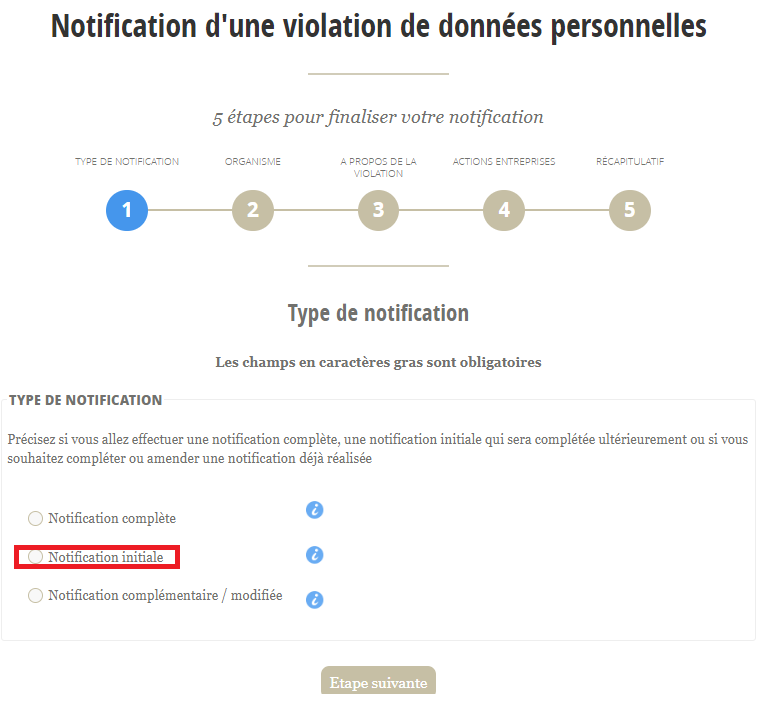
2. Selecteer "Initiële melding". U kunt later terugkeren naar uw melding terwijl u meer informatie verzamelt:
3. Voer uw SIREN-nummer in.
1. Als u geen SIREN-nummer hebt, vink dan het rode vakje aan:
\
Vergeet niet alle onderstaande velden in te vullen:
\
:warning: De contactpersoon is soms anders dan de wettelijke vertegenwoordiger. Als het dezelfde persoon is, moet u toch beide secties invullen:
4\. Op deze pagina moet u zoveel mogelijk details verstrekken, ook al gaat het slechts om de initiële melding.
{% hint style="info" %}
Ter herinnering: u kunt op deze onderdelen terugkomen zodra u de ontbrekende informatie hebt.\
\
Als u in deze fase niet alle relevante secties kunt invullen, raden wij u aan alleen de onderdelen in te vullen die u kent en er later op terug te komen.
{% endhint %}
5. Wat de mogelijke gevolgen betreft, moet u uw interpretatie van de situatie aangeven. U kunt dit aanpassen naarmate de situatie zich ontwikkelt en op basis van feedback van de CNIL.
6. In deze fase ziet u een samenvatting van alle informatie die u hebt ingevoerd. Controleer of alle informatie correct is voordat u bevestigt:
7. Zodra u deze stap hebt gevalideerd, ontvangt u per e-mail een bevestiging van uw melding. U krijgt de optie om een PDF-versie van deze melding te downloaden. Wij raden u aan deze te downloaden terwijl u wacht op de e-mail, aangezien deze PDF niet wordt verzonden:
8. Uw melding is in behandeling genomen. De CNIL neemt contact met u op over de vervolgactie die op uw melding is ondernomen.
---
# Agent Instructions: Querying This Documentation
If you need additional information that is not directly available in this page, you can query the documentation dynamically by asking a question.
Perform an HTTP GET request on the current page URL with the `ask` query parameter:
```
GET https://docs.stoik.io/help/help-nl/cyberaanval/fr-how-to-notify-the-cnil-in-the-event-of-a-data-breach.md?ask=
```
The question should be specific, self-contained, and written in natural language.
The response will contain a direct answer to the question and relevant excerpts and sources from the documentation.
Use this mechanism when the answer is not explicitly present in the current page, you need clarification or additional context, or you want to retrieve related documentation sections.
.png)
.png)
.png)
.png)
.png)
.png)
.png)