> For the complete documentation index, see [llms.txt](https://docs.stoik.io/llms.txt). Markdown versions of documentation pages are available by appending `.md` to page URLs; this page is available as [Markdown](https://docs.stoik.io/mdr/management/users.md).

# Users table

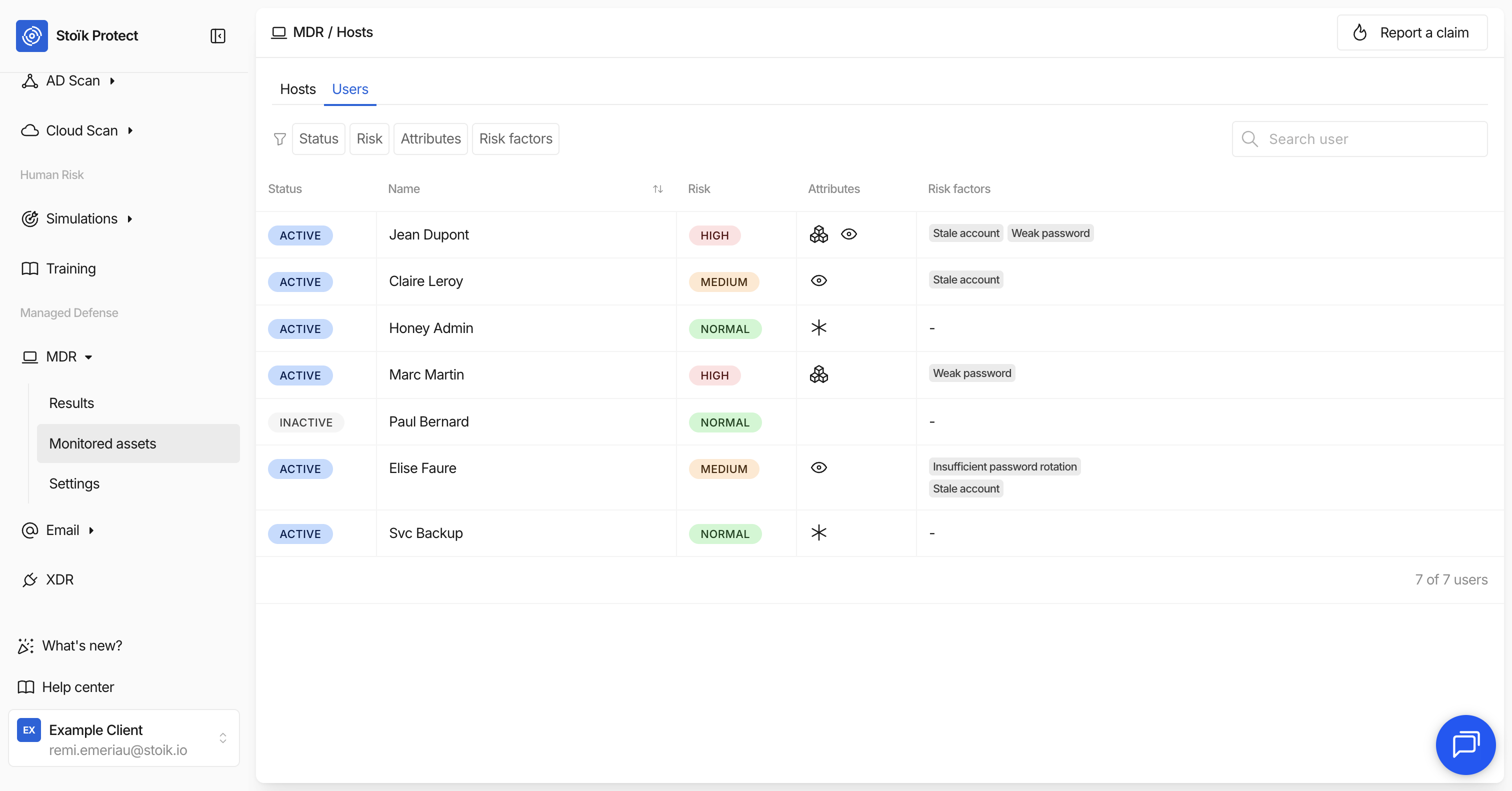
The `MDR` > `Monitored Assets` > `Users` page on Stoïk Protect lists all Active Directory users monitored by the MDR service. Each user is assessed for identity-related risks such as weak or aged passwords, stale accounts, and more.

<figure><img src="https://2582414397-files.gitbook.io/~/files/v0/b/gitbook-x-prod.appspot.com/o/spaces%2FaDGGQ49Oui29Ft0kJjSm%2Fuploads%2Fgit-blob-202028efad10c945dc6f767477e5baf5231753fd%2FCapture%20d%E2%80%99%C3%A9cran%202026-05-07%20%C3%A0%2015.26.23.png?alt=media" alt=""><figcaption></figcaption></figure>

All values displayed in this table are retrieved directly from CrowdStrike. Stoïk displays them as-is and does not calculate or modify them.

## Columns

Each row in the table displays the following information:

<table><thead><tr><th width="208.9375">Column</th><th>Description</th></tr></thead><tbody><tr><td><strong>Status</strong></td><td>Whether the user account is <strong>Active</strong> or <strong>Inactive</strong>. Inactive users are archived accounts no longer in use.</td></tr><tr><td><strong>Name</strong></td><td>The display name of the user in Active Directory.</td></tr><tr><td><strong>Risk</strong></td><td>A risk score severity level: <strong>Normal</strong>, <strong>Medium</strong>, or <strong>High</strong>, based on the combined risk factors detected for this user.<br>Users with a risk score greater than 7.5 are considered high risk, indicating a high probability of compromise.</td></tr><tr><td><strong>Attributes</strong></td><td>Special flags assigned to the user by security analysts. See <a href="#attributes">Attributes</a>.</td></tr><tr><td><strong>Risk factors</strong></td><td>The specific identity risks detected on this user. See <a href="#risk-factors">Risk factors</a>.</td></tr></tbody></table>

You can search for a specific user by name using the search bar at the top of the table.

## Attributes

Attributes are special flags used by security analysts to track specific users or set traps for attackers. They appear as icons in the Attributes column.

<table><thead><tr><th width="216.55078125">Attribute</th><th>Meaning</th></tr></thead><tbody><tr><td><strong>Marked</strong></td><td>Users singled out by security analysts for easy identification throughout the console. This flag remains active for 48 hours by default.</td></tr><tr><td><strong>Watched</strong></td><td>Users requiring special attention, such as those who have resigned, are under notice, or are suspected of being motivated to cause organizational harm.</td></tr><tr><td><strong>Honey Token</strong></td><td>Deceptive accounts used to lure attackers. Any activity or change related to a Honey Token account triggers a dedicated detection indicating malicious network activity.</td></tr></tbody></table>

## Risk factors

Risk factors are specific identity vulnerabilities detected on a user account. Each factor appears as a badge in the Risk factors column. The more risk factors a user has, the higher their overall risk score will be.

<table><thead><tr><th width="220.5078125">Risk factor</th><th>Meaning</th></tr></thead><tbody><tr><td><strong>Insufficient password rotation</strong></td><td>The user's password is set to never expire, providing attackers an unlimited timeframe to conduct brute-force attacks. It is recommended to enforce a policy requiring users to change passwords periodically.</td></tr><tr><td><strong>Aged password</strong></td><td>The user's password has not been changed for an extended period of time.</td></tr><tr><td><strong>Exposed password</strong></td><td>The user's password has been found in a known data breach or in Group Policy Preference objects, making it potentially visible to unauthorized users.</td></tr><tr><td><strong>Password brute force</strong></td><td>A brute force attack has been detected against this user's account.</td></tr><tr><td><strong>Shared user</strong></td><td>Applied to a user who logs in from multiple locations simultaneously or in a suspicious pattern.</td></tr><tr><td><strong>Golden ticket</strong></td><td>A Kerberos Golden Ticket attack has been detected, which could allow an attacker to impersonate this user indefinitely.</td></tr><tr><td><strong>Stale account</strong></td><td>An account that has been dormant or inactive for more than three months. Stale users are risky because they are rarely monitored by the owner, allowing malicious activity to go unnoticed. It is recommended to periodically review stale users and delete or disable accounts no longer in use.</td></tr><tr><td><strong>Weak password</strong></td><td>The user's password has been identified as weak or vulnerable to dictionary attacks. It is recommended to mandate the use of strong, complex passwords.</td></tr></tbody></table>


---

# Agent Instructions
This documentation is published with GitBook. GitBook is the documentation platform designed so that both humans and AI agents can read, navigate, and reason over technical content effectively. Learn more at gitbook.com.

## Querying This Documentation
If you need additional information that is not directly available in this page, you can query the documentation by asking a question.

Perform an HTTP GET request on the following URL with the `ask` and `goal` query parameters:

```
GET https://docs.stoik.io/mdr/management/users.md?ask=<question>&goal=<user_goal>
```

`ask` is the immediate question: it should be specific, self-contained, and written in natural language.
`goal` is what the user is ultimately trying to achieve, the reason they need the answer. Sharing it helps GitBook give you a better, more relevant answer. A goal is most helpful when it describes the outcome the user wants rather than restating the question. For example, with `ask=how do I create an API token`, a goal like `automate deployments from our CI pipeline` lets GitBook tailor the answer to that use case.

The response will contain a direct answer to the question and relevant excerpts and sources from the documentation.

Use this mechanism when the answer is not explicitly present in the current page, you need clarification or additional context, or you want to retrieve related documentation sections.