For the complete documentation index, see llms.txt. This page is also available as Markdown.

Identity Security

Identity Security is SentinelOne's unified identity protection SKU. It covers three engines: ISPM (Active Directory posture assessment), ISIDP (real-time protection of Domain Controllers), and IDR (decoys on endpoints). Microsoft Entra ID integration is optional.

All paths below refer to the Singularity Operations Center sidebar (Policies and settings is the button at the bottom of the sidebar).

1

Prerequisites

Validate before touching the console.

Item
Requirement

Licenses

Endpoint (Core, Control or Complete) + Identity Security, on the Account and on every Site

Windows agents

≥ 25.2.3.437 on DCs, servers and the AD Connector server. Workstations (IDR): ≥ 24.1.5.277.

Legacy Identity Agent

DCs already on Windows agent 25.2: nothing to do. Only if the legacy Identity Agent is still present: uninstall it, then reboot (never alongside the Windows agent)

AD Connector server

Domain member server (not a DC), always on, 4 vCPU / 16 GB RAM

AD Connector → DC flows

53 · 88 · 389/636 · 445 · 5986 (WinRM HTTPS) · RPC Event Log

Outbound flows

HTTPS 443 / WebSocket to the S1 console for your region

AD service account

Standard user with non-expiring password, Kerberos AES 128/256, member of Remote Management Users and Event Log Readers

On every DC:

winrm quickconfig -transport:https     :: WinRM HTTPS (certificate issued to the DC FQDN)
winrm configsddl default               :: Read + Execute for the service account
:: Firewall: allow TCP 5986 + "Remote Event Log Management (RPC / RPC-EPMAP)"
2

Enable the Identity engine

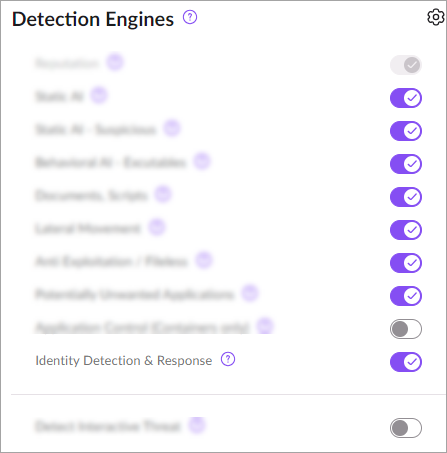
Policies and settings > Endpoint/Cloud Workload Security > Policy > Detection Engines

  1. Select the Account scope (or Site for an MSSP) in the scope selector at the top, then enable Identity Detection & Response.

  2. Keep the default Identity Settings, with the Update interval set to at least 60 min.

  3. In Policies and settings > Accounts, set Identity Security Posture Mode to Full.

Detection Engines > Identity Detection & Response.
3

AD Connector and domain

Policies and settings > Identity Security > Active Directory > Connect AD

Examples in this section use a fictitious forest acme.local, with the child domain corp.acme.local (NetBIOS CORP).

Create the AD service account

ISPM, ISIDP and IDR only need read access. A Domain Admin account is unnecessary and not recommended. ISPM remediation scripts are run separately, manually, by a Domain Admin.

Requirement
Why

Dedicated standard user (e.g. svc-s1-identity)

Read-only is enough, and ensures traceability

Long, random password that never expires

If the password changes in AD, the connection drops (status Disabled)

Created in the forest root domain

Required to assess the whole forest with Monitor subdomains

Kerberos AES 128 and AES 256 checked

Required for assessment

Member of Remote Management Users

WinRM access to DCs (threats and some exposures)

Member of Event Log Readers

Reads DC Security logs (source IP and user in detections)

Read on adminSDHolder, KRBTGT, Administrator, Domain / Schema / Enterprise Admins, MicrosoftDNS container

Otherwise the "Insufficient permissions for AD exposure assessment" exposure is raised

Read on CN=Deleted Objects

Detects mass account deletion

PowerShell example, to run on a DC or with RSAT, adjusting names as needed:

# 1. Create the account
New-ADUser -Name "svc-s1-identity" -SamAccountName "svc-s1-identity" `
  -UserPrincipalName "svc-s1-identity@acme.local" -Path "OU=Service Accounts,DC=acme,DC=local" `
  -AccountPassword (Read-Host -AsSecureString "Password") -Enabled $true `
  -PasswordNeverExpires $true -CannotChangePassword $true `
  -KerberosEncryptionType AES128,AES256

# 2. Built-in groups
Add-ADGroupMember -Identity "Remote Management Users" -Members "svc-s1-identity"
Add-ADGroupMember -Identity "Event Log Readers"       -Members "svc-s1-identity"
:: 3. Read rights (List Contents + Read Property), inherited
dsacls "DC=acme,DC=local" /I:T /g ACME\svc-s1-identity:LCRP
dsacls "CN=Deleted Objects,DC=acme,DC=local" /takeownership
dsacls "CN=Deleted Objects,DC=acme,DC=local" /I:T /g ACME\svc-s1-identity:LCRP

:: 4. On EVERY DC: WinRM access and Security log read for Network Service
winrm configsddl default                       :: add the account, check Read + Execute
wevtutil gl security                           :: output must contain (A;;0x1;;;S-1-5-20)
wevtutil sl security /ca:"<current SDDL>(A;;0x1;;;S-1-5-20)"

With Monitor subdomains, repeat the dsacls commands in every domain where default permissions have been restricted.

Choose the AD Connector server

  • Domain member server, not a DC. Example: srv-s1adc01.corp.acme.local.

  • Always on and not network-quarantined, Windows agent ≥ 25.2.3.437.

  • It must resolve via DNS and reach every declared domain on ports 53, 88, 389/636, 445 and 5985/5986.

  • A single forest, even with multiple domains: one connector is enough. Isolated forests without trust: one connector per forest.

Quick checks to run from this server:

Resolve-DnsName corp.acme.local
Test-NetConnection dc01.corp.acme.local -Port 636     # LDAPS
Test-NetConnection dc01.corp.acme.local -Port 5986    # WinRM HTTPS

Complete the Connect AD wizard

  1. AD Connector: type at least 3 characters of the hostname (e.g. srv), pick the endpoint with a green status, then Next. A banner confirms the connection after a few minutes.

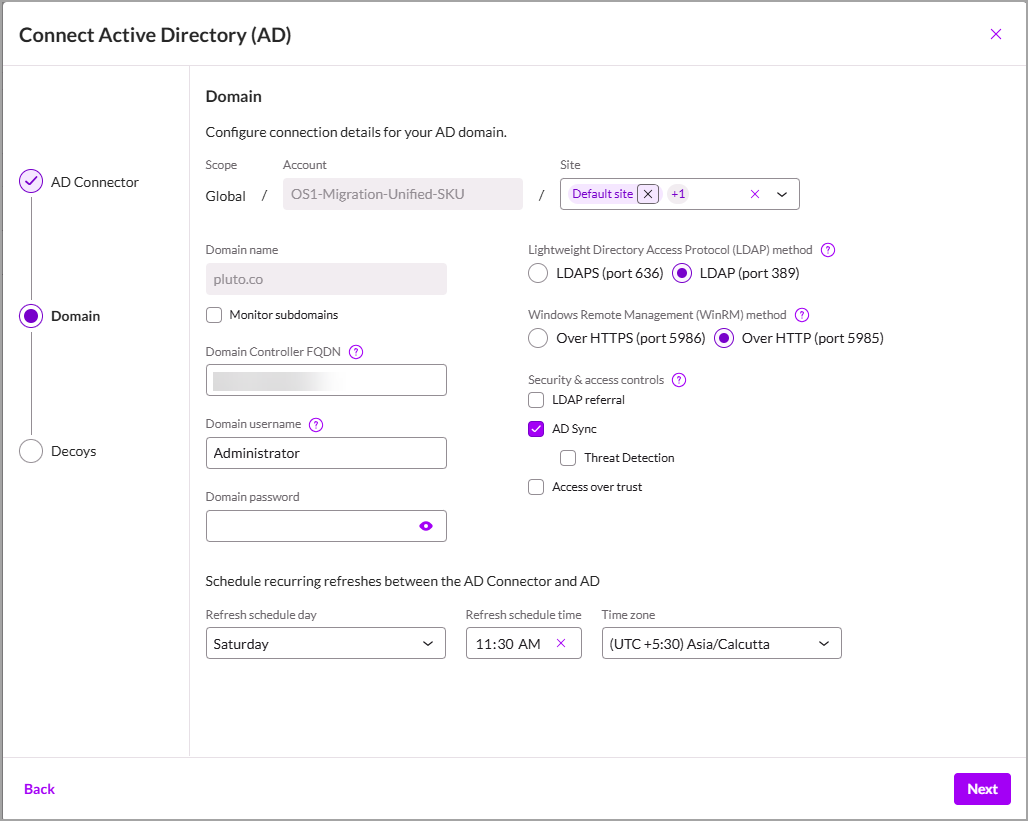
  2. Domain: fill in the fields from the table below, then Next. The console runs an LDAP test, and the domain is saved only if the test succeeds.

  3. Decoys: configure the decoys (see below), then Finish.

Domain step of the wizard. In this documentation example, LDAP and WinRM HTTP are selected; in production, prefer LDAPS and WinRM HTTPS.
Field
What to enter
Example

Site

At Account scope: the sites that inherit this domain (useful for IDR and ISIDP). "All" does not cover sites created later.

Paris, Lyon

Domain name

The domain's DNS FQDN, never the NetBIOS name. To cover the whole forest, enter the root domain.

acme.local or corp.acme.local, not CORP

Monitor subdomains

Assesses every domain in the forest (same tree and other trees). Without this box, subdomains are discovered but not assessed.

Checked

Domain Controller FQDN

The FQDN of one DC in the domain, resolvable by the AD Connector. An RODC is accepted. No IP address. Other DCs are discovered automatically (PDC first).

dc01.corp.acme.local, not 10.0.0.10

Domain username

The service account, in UPN, NetBIOS or plain-name format

svc-s1-identity@acme.local, ACME\svc-s1-identity, or svc-s1-identity; not ACME.LOCAL\svc-s1-identity

Domain password

Enter carefully: a wrong password locks the account after repeated attempts

Refresh schedule (day, time, time zone)

AD data refresh, to schedule during off-peak hours. It does not trigger the ISPM assessment, which stays fixed at Saturday 04:00 UTC.

Sunday · 02:00 · Europe/Paris

Protocols and options

OptionChoicePrerequisites and consequences

LDAP method

LDAPS (636), recommended

Encrypts traffic between the connector and the DCs. Requires a valid server certificate on the DCs (AD CS or a "Kerberos / Domain Controller Authentication" certificate) and port 636 open. Check: ldp.exe, SSL connection to dc01.corp.acme.local:636.

LDAP (389)

Unencrypted channel, reserved for DCs without a certificate or for troubleshooting. The "LDAPS connection failed" error prompts you to retry over LDAP. Fixed ports, not configurable.

WinRM method

HTTPS (5986), recommended

Requires an HTTPS listener on every DC, with a certificate whose Subject is the DC FQDN (the LDAPS certificate works), and port 5986 open: winrm quickconfig -transport:https.

HTTP (5985)

If DCs have no certificate. Authentication remains Kerberos, but AllowUnencrypted=true is required on both client and service. Without WinRM on all DCs, Threat Detection fails and some exposures become Skipped.

LDAP referral

Checked if the forest has subdomains

Follows referrals to subdomains: ISIDP and IDR policies then also apply to child domains, which become visible in Protocol Configuration. The account must be able to query these subdomains. If enabled afterwards, run Refresh AD Data.

AD Sync

Checked

Syncs user and group attributes. Required for Threat Detection, CCP, compromised account scanning and asset inventory. The first sync can take a while.

Threat Detection

Checked (requires AD Sync)

Real-time ISPM threats: password spray, mass lockouts and resets, etc. Relies on a persistent LDAP connection to the PDC and on WinRM. Disabling it deletes the synced objects.

Access over trust

Only for another trusted forest

To assess a domain in another forest using the main forest's account. Two extra fields: Trust domain name and Trust domain controller (FQDN, no IP). Cannot be edited afterwards: delete and recreate.

Access over trust example: the filiale.local forest trusts acme.local. Enter Domain name = filiale.local, Username = svc-s1-identity@acme.local, Access over trust = checked, Trust domain name = acme.local, Trust domain controller = dc01.acme.local. The connector must resolve and reach the filiale.local DCs.

Decoys (used by IDR)

Field
Advice
Example

Country for name generator

Country consistent with your users

France

Service (SPN) prefix

The prefix of your real service accounts, if any

svc

Name format

Same format as your real usernames. Variables: %FN% (first name), %LN% (last name), %FNI% and %LNI% (initials), %#n% (n random digits).

%FNI%.%LN% → j.dupont

Hostname format

Modeled on your workstation and DC naming

Custom: PC- + digits

IP Address format

Range or CIDR of more than 250 addresses, never used in production (otherwise false positives)

10.250.0.0/24

After validation

  • The domain status changes to Enabled. It reverts to Disabled if the connector goes down or the account password changes.

  • The console runs AD learning, sync, then the ISPM assessment (about 30 min). Multiple domains added at once are processed one after another.

  • Default policies are created, inactive.

  • Each domain can be declared only once per organization. After deleting one, wait 120 s before recreating it. After adding a DC, click Refresh AD Data, otherwise DCSync false positives appear.

Save error
Action

Authentication failed

Check the account and password (and any lockout)

LDAPS connection failed

Check the DC certificate and port 636, or switch back to LDAP

The user account does not have the permissions…

Review the rights in "Create the AD service account" above

Domain Controller down / not available / busy

Check DNS and flows from the AD Connector, then retry

4

ISPM: AD posture

Policies and settings > Identity Security > Identity posture settings

Nothing else to do: the assessment starts as soon as the domain is saved (about 30 min), then runs every Saturday at 04:00 UTC.

  1. For an immediate scan: Scan Now.

  2. To review results: Misconfigurations > Identity. Address Critical and High exposures first (click the misconfiguration, then Actions > Mitigate > Download Script).

5

ISIDP: DC protection

Policies and settings > Identity Security > Identity Policies (Identity provider policy / Conditional Access policy tabs)

Two default policies were created in the previous step, inactive and read-only. Duplicate them:

  1. Conditional Access policy: duplicate Default_policy_account_ca, add an Attack based rule covering all attacks with the Audit action, then activate it.

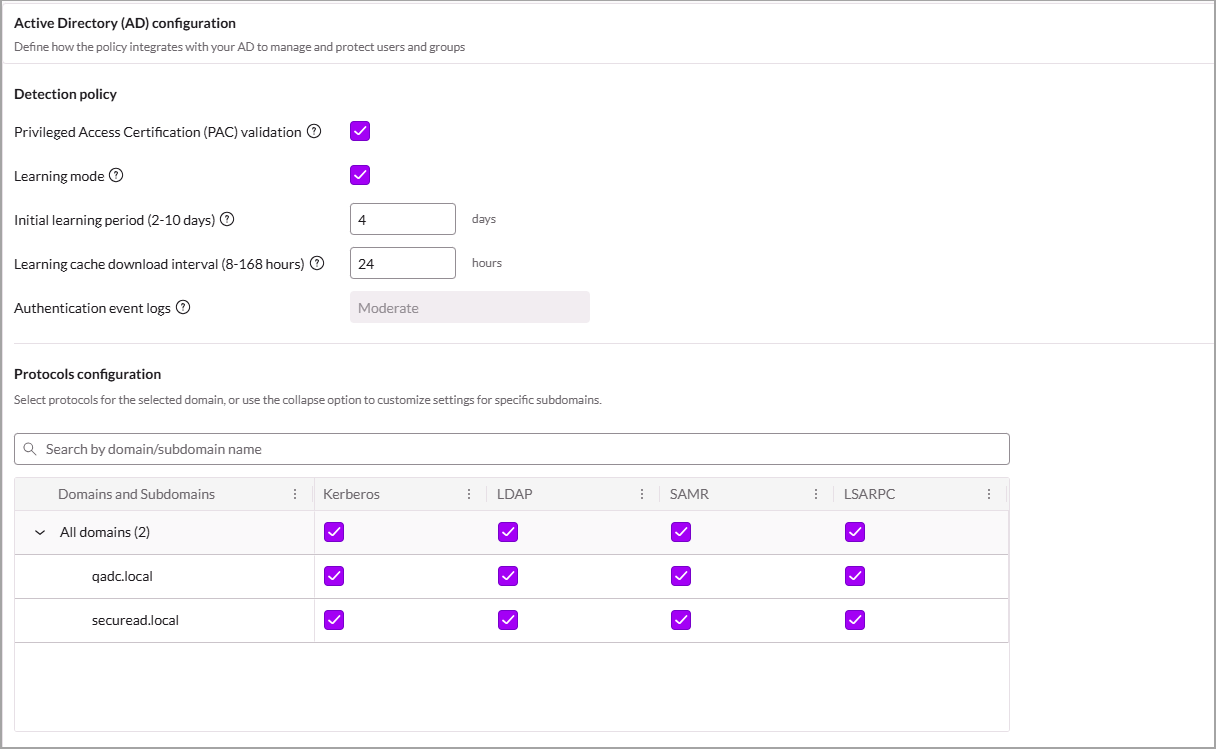
  2. Identity provider policy: duplicate Default_policy_account_idp and check the following:

    • All domains are selected and Apply to Windows servers is checked.

    • PAC validation stays enabled, unless a PAM or JIT solution is in place. Learning mode: enabled, 4 days.

    • Kerberos, LDAP, SAMR and LSARPC protocols checked. Add-on: Pin version at N-1.

    • Recommended: Compromised credential configuration enabled (breach databases, no mitigation at first).

    • The CA policy from step 1 is selected.

  3. Actions > Activate Policy. To push immediately: sidebar Sentinels > Endpoints, select the DCs, then Actions > Agent Actions > Push Identity Policy Changes.

Identity provider policy: detection and protocols.

After a few days without false positives, switch attack rules from Audit to Block.

6

IDR: decoys on endpoints

Policies and settings > Identity Security > Identity Policies > Identity protection policy

  1. Click New Identity protection policy, with the AD PowerShell response set to Alert.

  2. Add 4 rules: Privileged Administrators, Service Accounts, Domain Controllers, Delegated Admins. Select the real objects, then check Add Decoys and Hide Real Objects.

  3. Create, then Actions > Activate Policy.

Test from a domain workstation: net group "Domain Admins" /domain should return a decoy account. With a 25.2.3+ agent, the detection shows up as an indicator in Event Search (query: indicator.name = 'IdentityDeceptivePing'). Other alerts are in Alerts.

7

Microsoft Entra ID (optional)

Only if the customer uses Entra ID: Policies and settings > Cloud accounts > Microsoft Azure

Connect an Entra ID tenant

Required: a tenant Global Admin account and the Tenant ID. Optional: the Object ID of a "risky users" group.

  1. Connect account: type Tenant, check Enable Identity Security.

  2. Connection name, Tenant ID, and Sync Microsoft Entra ID user accounts enabled.

  3. In Azure: Tenant Properties > Access management for Azure resources = Yes, then sign out and back in.

  4. Download the Terraform template and run it in Azure Cloud Shell:

terraform init && terraform apply -auto-approve
  1. Paste application_id and client_secret, then Select All and automatic onboarding, and Finish.

Results appear in Misconfigurations > Identity.

8

Verify that an alert is raised

From a domain-joined workstation, with a domain account, preferably in a pilot.

  1. To see results right away: in the Identity provider policy, temporarily disable Learning mode (during learning, only High alerts are raised). Then push the policy to the DCs.

  2. Run the commands:

net group "Domain Admins" /domain      :: ISIDP (SAMR) + IDR (decoy in the response)
dsquery * -filter "(admincount=1)"      :: ISIDP (LDAP), requires RSAT AD Tools
  1. Check the Alerts sidebar (period Last 1 hour), Detection Engine filter:

    • ADSecure-DC, -SAMR or -LDAP for ISIDP (privileged account enumeration).

    • ADSecure-EP for IDR. With a 25.2.3+ agent, look for the indicator in Event Search instead.

  2. Re-enable Learning mode once the test is validated.

Final check

  • The AD Connector shows an active status in Policies and settings > Identity Security > Active Directory.

  • ISPM misconfigurations appear in the Misconfigurations sidebar, Identity tab.

  • The Conditional Access policy and the Identity provider policy are active.

  • The Identity protection policy is active.

  • The Dashboards > Identity dashboard shows data, and alerts are visible in Alerts > Identity.

  • AD and Entra assets are visible in Inventory > Identity.

Last updated

Was this helpful?