> For the complete documentation index, see [llms.txt](https://docs.stoik.io/llms.txt). Markdown versions of documentation pages are available by appending `.md` to page URLs; this page is available as [Markdown](https://docs.stoik.io/mdr/management/hosts.md).

# Hosts table

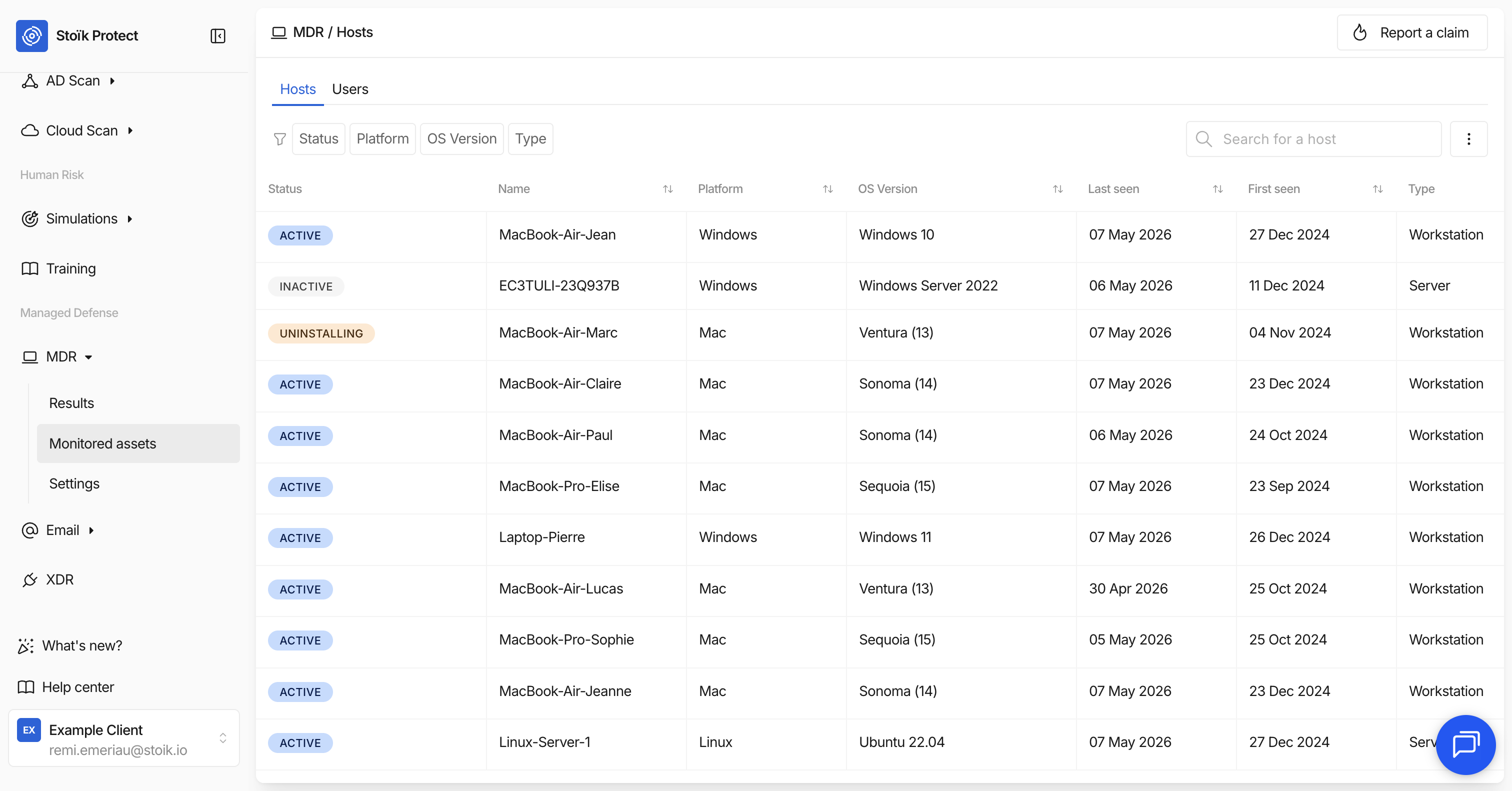
The `MDR` > `Monitored Assets` > `Hosts` page lists all endpoints (workstations, servers, and mobile devices) monitored by the MDR service. Each host is a device on which an EDR agent (CrowdStrike, SentinelOne, or Microsoft Defender) has been deployed.

<figure><img src="https://2582414397-files.gitbook.io/~/files/v0/b/gitbook-x-prod.appspot.com/o/spaces%2FaDGGQ49Oui29Ft0kJjSm%2Fuploads%2Fgit-blob-0f3fd4b18a821c491cd0d38912c289ea2a0b9bf9%2FCapture%20d%E2%80%99%C3%A9cran%202026-05-07%20%C3%A0%2015.33.07.png?alt=media" alt=""><figcaption></figcaption></figure>

## Columns

Each row in the table displays the following information:

<table><thead><tr><th width="164.3984375">Column</th><th>Description</th></tr></thead><tbody><tr><td><strong>Status</strong></td><td>Whether the host is <strong>Active</strong>, <strong>Inactive</strong>, or <strong>Uninstalling</strong>. See <a href="#statuses">Statuses</a>.</td></tr><tr><td><strong>Name</strong></td><td>The hostname of the device as reported by the EDR agent.</td></tr><tr><td><strong>Platform</strong></td><td>The operating system family (e.g. Windows, macOS, Linux).</td></tr><tr><td><strong>OS Version</strong></td><td>The specific version of the operating system running on the device.</td></tr><tr><td><strong>Last Seen</strong></td><td>The date the EDR agent last reported activity to the provider.</td></tr><tr><td><strong>First Seen</strong></td><td>The date the EDR agent was first detected on the device.</td></tr><tr><td><strong>Type</strong></td><td>The device category as reported by the EDR provider, such as Workstation, Server, Domain Controller, or Mobile.</td></tr><tr><td><strong>Email</strong></td><td>The email address associated with the device, if available.</td></tr><tr><td><strong>Username</strong></td><td>The last user who logged into the device, if available.</td></tr></tbody></table>

You can search for a specific host by name using the search bar at the top of the table. You can also filter hosts by status, platform, OS version, and type using the filter options.

## Statuses

The status of a host reflects the state of the EDR agent on the device. It combines the agent's activity status from the EDR provider with any pending actions initiated from Stoïk Protect.

<table><thead><tr><th width="175.3203125">Status</th><th>Meaning</th></tr></thead><tbody><tr><td><strong>Active</strong></td><td>The EDR agent is online and reporting normally. The device is actively monitored.</td></tr><tr><td><strong>Uninstalling</strong></td><td>An uninstallation has been triggered from Stoïk Protect. The agent is in the process of being removed. For CrowdStrike, this status is set as soon as the uninstallation process is confirmed, even if the actual removal has not yet completed on the device.</td></tr><tr><td><strong>Inactive</strong></td><td>The EDR agent has been removed or has not reported activity for 30+ days. Inactive hosts are no longer actively monitored.</td></tr></tbody></table>

## Exporting host data

You can export the full list of monitored hosts as a file. The export includes all columns except Status: name, platform, OS version, first seen, last seen, type, email, and username.

## Uninstalling an EDR agent

For hosts with an **Active** status, you can trigger an uninstallation directly from the Hosts table using the action button on the right side of the row. This feature is available for CrowdStrike and SentinelOne endpoints. See [Uninstalling a host](/mdr/management/uninstall.md).


---

# Agent Instructions
This documentation is published with GitBook. GitBook is the documentation platform designed so that both humans and AI agents can read, navigate, and reason over technical content effectively. Learn more at gitbook.com.

## Querying This Documentation
If you need additional information that is not directly available in this page, you can query the documentation by asking a question.

Perform an HTTP GET request on the following URL with the `ask` and `goal` query parameters:

```
GET https://docs.stoik.io/mdr/management/hosts.md?ask=<question>&goal=<user_goal>
```

`ask` is the immediate question: it should be specific, self-contained, and written in natural language.
`goal` is what the user is ultimately trying to achieve, the reason they need the answer. Sharing it helps GitBook give you a better, more relevant answer. A goal is most helpful when it describes the outcome the user wants rather than restating the question. For example, with `ask=how do I create an API token`, a goal like `automate deployments from our CI pipeline` lets GitBook tailor the answer to that use case.

The response will contain a direct answer to the question and relevant excerpts and sources from the documentation.

Use this mechanism when the answer is not explicitly present in the current page, you need clarification or additional context, or you want to retrieve related documentation sections.