

Do I need to uninstall the antivirus before the EDR setup?
Yes, Stoïk strongly recommends uninstalling any existing antivirus or other EDR solution before installing CrowdStrike EDR, in order to prevent any conflicts that could compromise the proper functioning of the solution.
The Stoïk teams have implemented a gradual three-phase deployment to limit the risk of blockages and the impact on user workstations, with phase 1 allowing you to install the EDR while keeping your antivirus or EDR in place. It is therefore essential to uninstall your previous antivirus or EDR solution before moving on to phase 2.
⚠️ If you do not uninstall it before moving on to phase 2, a "blue screen" may appear when the workstation is restarted.
However, some antivirus or EDR solutions, whether single-use or multi-use, may cause blockages as early as phase 1 of the deployment. These solutions are listed later in this document.
Single-use antivirus
These programs have only one function: antivirus protection.
Bitdefender: must be uninstalled during phase 1 of deployment. If you do not uninstall it, a blue screen may occur when you restart your computer.
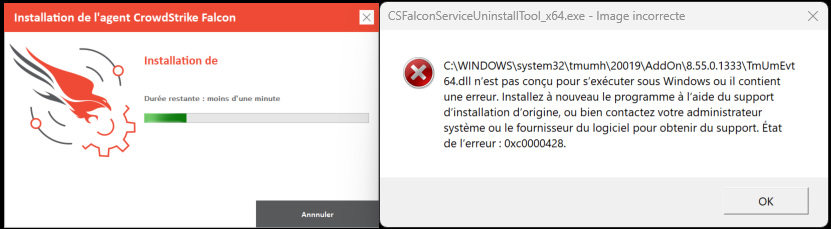
Trend Micro: must be uninstalled starting from deployment phase 2, otherwise error messages may appear.
macOS: No known conflicts, no action required.
Multi-purpose solutions
These software programs offer several security functions in a single tool: antivirus, firewall, USB device control, integrated EDR, etc. Common examples include WithSecure, ESET, and Kaspersky. In this case, simply disable the antivirus functionality only (no need to uninstall the entire software).
For Windows Defender, there is no need to uninstall it; it is fully compatible with the Stoik EDR. It will remain active in phase 1, but the antivirus engine will be automatically disabled when CrowdStrike moves to phase 2.
Beware of side effects on Windows:
If you completely disable the multi-purpose solution, and it previously managed your firewall, then:
The Windows Firewall will automatically take over.
However, it will apply its own default, very restrictive rules.
This can completely block your network connections.
The solution is to reconfigure your local Windows firewall with the necessary rules and exclusions to restore the expected connections.
Example of an error message:
Last updated
Was this helpful?